
Associate
December 30, 2024
Solved

When installing/using different toolchain "error running CDT Builder" preventing build

  • December 30, 2024
  • 3 replies
  • 1146 views

Hello All,

I have searched the forums and cant find something that can help me solve this, so I am coming out of the shadows for some assistance.

I am completely new to STM32CubeIDE and I am attempting to build a project, using a different toolchain than what is the default.

When I attempt to build the project using the default toolchain "GNU Tools for STM32 (12.3.rel1)", the project builds just fine. However due to a problem with that toolchain on the project, I am required to use a different toolchain.

When installing and using a different toolchain (I have tried multiple and have gotten the same following issue), I get the following error:
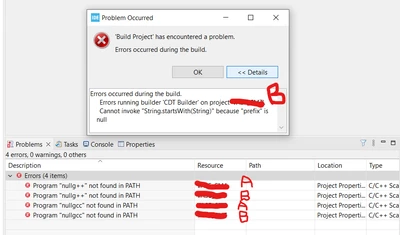
 

CriticalFandango_0-1735575742655.png


Can anyone help, or maybe even point a poor noobie in the direction of an answer for this issue?

Thank you!

Best answer by CriticalFandango

Okay, well, I reinstalled the program and updated, and now everything is working hunky dory. Thank you for taking the time to respond Pavel.

I am not sure how to mark this topic closed.

3 replies

Pavel A.
Super User
December 30, 2024

The CubeIDE user guide has something about using alternative toolchains. Have you read it?

Associate
December 30, 2024

I have read section 2.3.1.1 of the UM2609, and followed that in order to install and use the different toolchains.

Pavel A.
Super User
December 30, 2024

Which toolchain do you use? Does it have similar layout (subdirectories etc) as the CubeIDE toolchain?


Associate
December 30, 2024


The default toolchain that I used that *is* capable of completing a build is GNU Tools for STM32 (12.3.rel1)

CriticalFandango_0-1735587867162.png


And the two that I have tried that are *not* capable of completing a build are as follows:

CriticalFandango_1-1735587918008.png


I apologize for my lack of understanding, but what do you mean by "similar layout (subdirectories)"? I am not sure where to look to answer that question.

Interestingly though I have noticed one seemingly major difference when selecting different toolchains.
When selecting the default and functioning toolchain, 12.3.rel1, in the MCU/MPU Settings, all of the available dropdowns are filled with selections:

CriticalFandango_2-1735588080152.png

However, when selecting a different Toolchain, say 10.3-2021.10, all of those dropdowns are empty, and it also is missing dropdowns:

CriticalFandango_3-1735588160997.png


CriticalFandangoAuthorBest answer
Associate
December 30, 2024

Okay, well, I reinstalled the program and updated, and now everything is working hunky dory. Thank you for taking the time to respond Pavel.

I am not sure how to mark this topic closed.