
Senior
June 4, 2025
Solved

Where are the header files in Project Explorer?

  • June 4, 2025
  • 1 reply
  • 762 views

Where are the header files in Project Explorer? I can open Application/User/main.c and see that it includes main.h, but it's nowhere to be found in the Project Explorer. If i right-click main.h in its includfe statement in main.c and select 'Open Declaration', it opens main.h. Hovering on the editor tab, I see it's in my project under 'Inc', but that folder does not show up in Project explorer, either.

So I use File Explorer and find it in my project folder in the 'Inc' folder that does not appear in Project Explorer. I don't understand this; someone please explain it to me.

Also, I want to add a header file, so I select File/New/Header File, and it opens a dialog box where I use the 'Browse...' button to select a home for it. The 'Inc' folder does not appear there, either. Where do I put my new header file? I'm totally at sea on this.

I'm using:

STM32CubeIDE
Version: 1.18.1
Build: 24813_20250409_2138 (UTC)


Thanks!
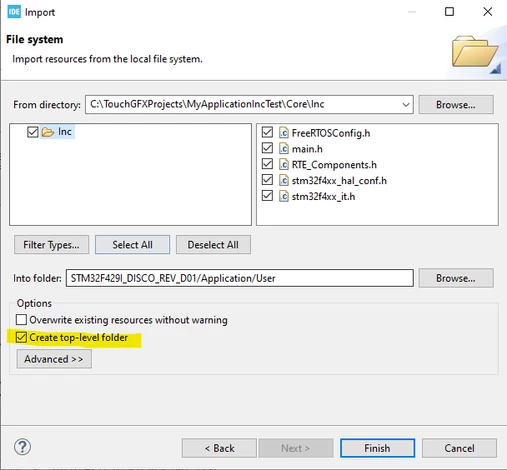
Best answer by Karl Yamashita

In the project tree, right click on the User folder and click Import>File System.

Then browse to where the Inc folder is located and select it. Then in the left pane, select the Inc folder, which then should select all the files in the right pane. Then check the Create Top-level folder, Finish.  

Below is an example.


KarlYamashita_0-1749154984226.png


1 reply

Andrew Neil
Super User
June 4, 2025

@jlthompson wrote:

 I see it's in my project under 'Inc', but that folder does not show up in Project explorer


It should do!

What host OS are you running on?

Please post a screenshot of your Project Explorer.


@jlthompson wrote:

I want to add a header file, so I select File/New/Header File, and it opens a dialog box where I use the 'Browse...' button to select a home for it. The 'Inc' folder does not appear there, either.


Again, it should.

Please also show a screenshot of the actual folder structure on disk.


@jlthompson wrote:

Where do I put my new header file?


Anywhere you like!

It will need to be somewhere covered by your Include Paths.

A complex system that works is invariably found to have evolved from a simple system that worked.A complex system designed from scratch never works and cannot be patched up to make it work.
Senior
June 4, 2025

Here are screenshots of

File Explorer showing Inc folder with main header file

Project Explorer not showing Inc folder

New File Folder Selector not showing Inc folder

File Explorer showing Inc folder with main header file.pngNew File Folder Selector not showing Inc folder.pngProject Explorer not showing Inc folder.png

Senior
June 5, 2025

Also, if I put headers in the File Explorer Inc folder. main.c seems to know how to access them. But if I put them in the Project Explorer Application/User folder, it does not. I'm confused.

I'm in the process of adding the 'funbiscuit' Embedded CLI to a copy of the USART_Communication_TxRx_DMA_Init example project. Maybe that's the culprit. The icons on main.c and stm32g0xx_it.c are pretty hard to read, but they may be trying to indicate they are links and not actual files.