
Associate II
March 20, 2024
Solved

With STM32Cube IDE v1.15.0 update problem with STLink

  • March 20, 2024
  • 11 replies
  • 26040 views

Hello all,

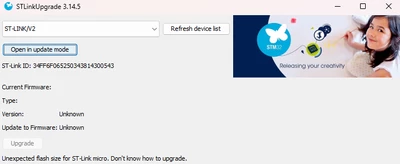
I have updated the STM32Cube IDE version to the 1.15.0, it has own STLinkUpgrade tool which is also updated to version 3.14.5. But a problem arised. It wants me to update my STLink V2 firmware. When I tried, It gives error like:

"Unexpected flash size for ST-Link Micro. Don`t know how to upgrade."
mcagriaksoy_0-1710936591320.png

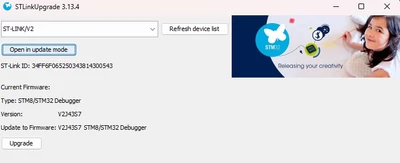
But I can use the older version 3.13.4 without any problem:
mcagriaksoy_1-1710936651740.png

Is there a problem caused by 3.13.5 or caused by my ST-Link V2?


    Best answer by mcagriaksoy

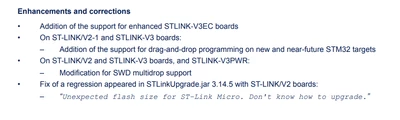
    Summary: I tried with the latest ST-LINK Updater exe version 3.15.6 and my problem has been resolved.


    Document: Firmware upgrade for ST-LINK, ST-LINK/V2, ST-LINK/V2-1 and STLINK‑V3 boards - Release note

    mcagriaksoy_0-1713437640213.png

    It is happy to see my issue on fixes issues list.

    The newer version of updater is not embedded on IDE yet. You need to download from here: STSW-LINK007 - ST-LINK, ST-LINK/V2, ST-LINK/V2-1, STLINK-V3 boards firmware upgrade - STMicroelectronics


    11 replies

    STTwo-32
    Technical Moderator
    March 20, 2024

    Hello @mcagriaksoy 

    Can you give more details about the board/MCU that you are using.

    Best Regards.

    STTwo-32 

    Associate II
    March 20, 2024

    Hello, @STTwo-32 I am using STLink V2, my MCU is "STM32G491CCU"

    mcagriaksoy_0-1710942817265.png


    Bob S
    Super User
    March 20, 2024

    How about a picture of the bottom side of the STLink.  There are quite a few clones out there.  This may be that the newer updater version had more robust checks for clone units.  Just guessing here.

    costi
    Associate III
    March 20, 2024

    I have the same situation after the last CubeIDE update.

    PHolt.1
    Senior
    March 21, 2024

    My v15 updated my STLINK V3 successfully but the debugger is not found afterwards

    Encountered Error when opening C:\ST\STM32CubeIDE_1.13.2\STM32CubeIDE\plugins\com.st.stm32cube.ide.mcu.externaltools.cubeprogrammer.win32_2.1.200.202311302303\tools\bin\STM32_Programmer_CLI.exe
    Error in STM32CubeProgrammer

    (the file is present)

    Cube IDE 1.15.0 is brain-dead. I reverted to Cube 1.14.1 and everything works. v15 brings GCC v12 tools and they have other issues - see other threads which suggest that some dud code is generated. But with no working debugger I can't track it down, obviously.

    DmitriG
    Associate
    March 21, 2024

    I have the same problem... (

    STTwo-32
    Technical Moderator
    March 21, 2024

    Hello All, 

    For the original issue of the Post, I have reported internally for more investigation via Internal ticket number: 176701. For the second issue initiated by @PHolt.1, it is also reported by my colleague @Imen.D for investigation under ticket number 176694.

    (PS: Internal tickets numbers are only for reference, not available outside of ST) 

    Best Regards.

    STTwo-32

    mƎALLEm
    Technical Moderator
    March 21, 2024

    Hello,

    Try to update your ST-Link FW with the STSW-LINK007 ST-Link firmware updater application. Use ST-LinkUpgrade.exe executable.


    "To give better visibility on the answered topics, please click on ""Accept as Solution"" on the reply which solved your issue or answered your question."
    Associate II
    March 25, 2024

    Hi,

    I tried but same. The versions of ST-Link firmware updater applications are same.

    LPode.1
    Associate II
    March 21, 2024

    Hi, I have exactly same problem.

    Rom size problem could be from wrong file path. Let 's wait a fix.

    Thanks


    PHolt.1
    Senior
    March 21, 2024

    Just a data point: Cube 1.15.0 successfully upgraded firmware in my STLINK V3 ISOL but could not use the debugger afterwards (error messages posted above).

    I did not try running Cube on the target without upgrading the debugger, which unfortunately I did immediately.

    Explorer
    March 25, 2024

    I've downloaded the ST-Link upgrade v3.14.5 from:

    https://www.st.com/en/development-tools/stsw-link007.html

    Unpack the zip and run STLinkUpgrade exe in the windows folder.

    I was surprised when this successfully upgraded the ST-Link/V2 to V2.J44.S7 and then allowed the IDE to run without prompting for an upgrade it cannot complete!

    Hope this works for you until a fix comes out for STM32Cube IDE 1.15.0

    Regards Ian


    Associate
    March 25, 2024

    Thank you for posting this. That solved my problem.

    PHolt.1
    Senior
    March 28, 2024

    It is a custom design of mine; not an ST board.

    The STLINK V3 ISOL firmware update worked. The issue was with Cube IDE reported a missing file (see my post on eevblog; could not post the link here sine this forum removes certain words) but the file was not missing. Multiple threads here too.

    I reverted to 1.14.1 and everything works again. I will freeze this project on 1.14.1 because one cannot just keep updating for ever, and allocate time to a production product to sort out a broken new tool version.


    mcagriaksoyAuthorBest answer
    Associate II
    April 18, 2024

    Summary: I tried with the latest ST-LINK Updater exe version 3.15.6 and my problem has been resolved.


    Document: Firmware upgrade for ST-LINK, ST-LINK/V2, ST-LINK/V2-1 and STLINK‑V3 boards - Release note

    mcagriaksoy_0-1713437640213.png

    It is happy to see my issue on fixes issues list.

    The newer version of updater is not embedded on IDE yet. You need to download from here: STSW-LINK007 - ST-LINK, ST-LINK/V2, ST-LINK/V2-1, STLINK-V3 boards firmware upgrade - STMicroelectronics