
JRobe.2
Associate III
June 18, 2021
Solved

Can CubeMonitor be used with uVision?

  • June 18, 2021
  • 1 reply
  • 769 views

Using a STM32L562E-DK.

Also using a uLinkPro SW probe.

This topic has been closed for replies.
Best answer by stephane.legargeant

Hello

For the probe, STM32CubeMonitor do not support the uLinkPro probe, but the ST-Link v3 availaible on the STM32L562E-DK is supported.

The tool can be used with uVision, the axf file can be used as executable file to list symbols. There are 2 options : use tools in sequence, or use at the same time :
  • Use in sequence : Do not perform debug / flash and monitoring at the same time. In this case, uVision connect to the target to download and debug, and CubeMonitor connects when monitoring is running. When monitoring is not running, CubeMonitor disconnects from the target, so other tool can be used. This is the tool default configuration.
  • Use at the same time : Do do this, the ST-Link must be shared. In this case, both tool can access the probe at the same time, and you can debug and watch in CubeMonitor the variables. User must configure both tool to use the shared mode.
    • For CubeMonitor, refer to the wiki : How_to_configure_shared_mode
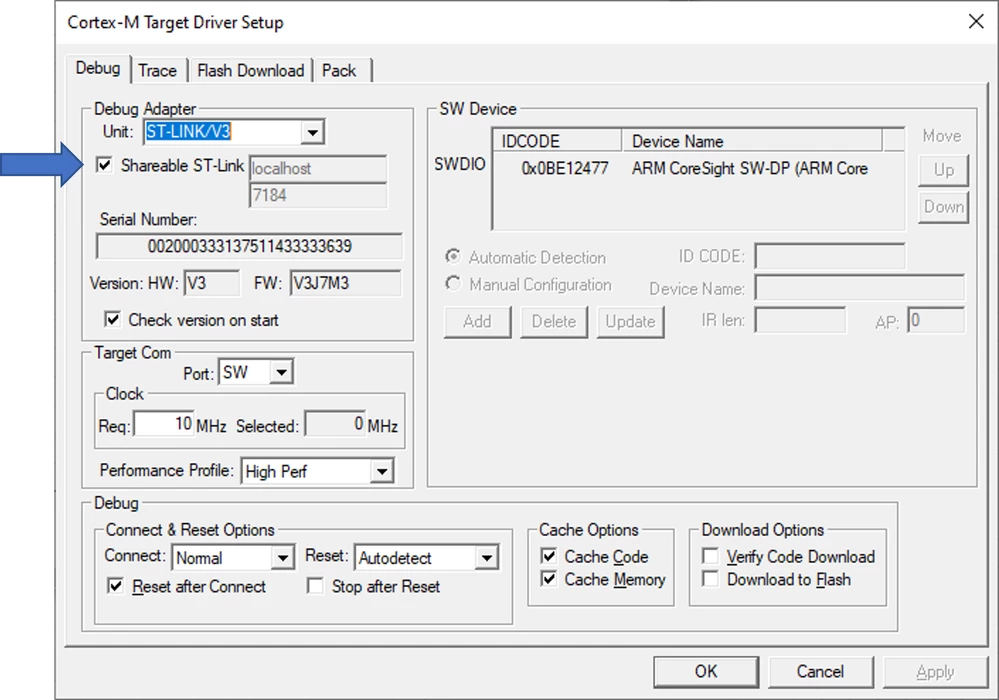
    • For uVision, in the target options, open the ST-Link Debugger Settings and click "Shareable ST-Link"0693W00000D1bPMQAZ.png

Please, let me know if it is clear or if you need additional information.

1 reply

stephane.legargeant
ST Employee
August 5, 2021

Hello

For the probe, STM32CubeMonitor do not support the uLinkPro probe, but the ST-Link v3 availaible on the STM32L562E-DK is supported.

The tool can be used with uVision, the axf file can be used as executable file to list symbols. There are 2 options : use tools in sequence, or use at the same time :

  • Use in sequence : Do not perform debug / flash and monitoring at the same time. In this case, uVision connect to the target to download and debug, and CubeMonitor connects when monitoring is running. When monitoring is not running, CubeMonitor disconnects from the target, so other tool can be used. This is the tool default configuration.
  • Use at the same time : Do do this, the ST-Link must be shared. In this case, both tool can access the probe at the same time, and you can debug and watch in CubeMonitor the variables. User must configure both tool to use the shared mode.
    • For CubeMonitor, refer to the wiki : How_to_configure_shared_mode
    • For uVision, in the target options, open the ST-Link Debugger Settings and click "Shareable ST-Link"0693W00000D1bPMQAZ.png

Please, let me know if it is clear or if you need additional information.