
Associate
January 9, 2026
Question

CubeMonitor - Can't expand chart horizontally beyond size 15?

  • January 9, 2026
  • 2 replies
  • 312 views

On Version 1.11.0

I'm aware that the chart can be resized with the 'Size' parameter.

However, attempting to expand it beyond size 15 horizontally just shuts the window down:
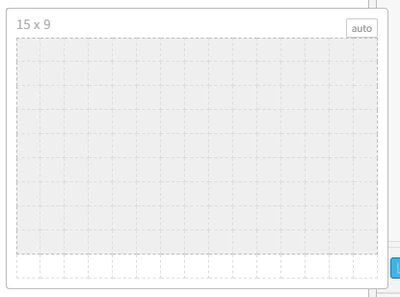
PaikMan_0-1767948174240.png

(Furthest I can go horizontally)

While it is possible to expand it out vertically to an arbitrary size.

Jut wondering if this is a bug or horizontal size 15 is the max limit for the chart.

on 4k Monitor the chart size of 15x9 is way too small.

    2 replies

    Richard.Chvr
    Technical Moderator
    January 9, 2026

    Hello @PaikMan 

    Chart size parameter is limited by the dashboard layout Width. to modify it:

    On the right side of the flow editor click on dashboard icon 

    RichardChvr_0-1767952369988.png

    In the Layout panel, move your mouse on the tab you want to expand, click on Layout

    RichardChvr_3-1767953299173.png

    You'll get access to the Width parameter

    RichardChvr_4-1767953324743.png


    To give better visibility on the answered topics, please click on Accept as Solution on the reply which solved your issue or answered your question.
    PaikManAuthor
    Associate
    January 13, 2026

    Hi @Richard.Chvr ,

    Looks like the configuration is a bit different on my version (1.11.0) 

    1. Here is what i get when i go on the dashboard tab:

    PaikMan_0-1768283322366.png

    2. when i click on the edit button for 'myChart' , i get a window like this:

    PaikMan_1-1768283391854.png

    - clicking once on the 'size' menu gives me this table-generator lookalike grid,

    on which when i try to go any further than 15 in terms of horizontal size just closes on me:

    PaikMan_2-1768283480134.png

    - double clicking on n x m chart size gives me this configuration window:

    PaikMan_3-1768283536160.png

    on which no matter what i put in for the horizontal size (tried 16, 30, 300...),

    the chart I get when I deploy the dashboard seems to have a fixed horizontal size of 15.


    Any further guidance would be much appreciated.

    Thanks.


    Richard.Chvr
    Technical Moderator
    January 13, 2026

    You need to move your mouse on the home "line" to get the layout button available

    RichardChvr_0-1768293728849.png


    To give better visibility on the answered topics, please click on Accept as Solution on the reply which solved your issue or answered your question.
    Richard.Chvr
    Technical Moderator
    January 15, 2026

    Sounds strange,

    Did you also change chart size after changing Width to 30?

    You can set it size to "auto" in order it fits the dashboard width

    To give better visibility on the answered topics, please click on Accept as Solution on the reply which solved your issue or answered your question.