

GBert.2
Senior
May 17, 2022
Solved

[CubeMonitor] Is the log-to-csv feature broken?

  • May 17, 2022
  • 5 replies
  • 2686 views

I'm trying to log my data in a .csv file, using the STM32CubeMonitor v1.4.0.

I'm configuring my ST processing node as follows:
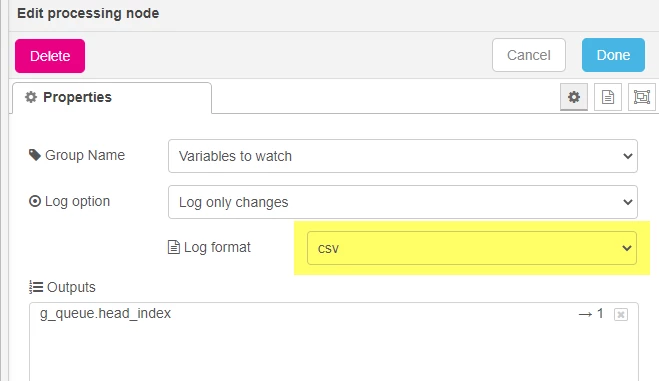
0693W00000Nq7PJQAZ.png 

Sadly, it produces .csv with no data in them (see next screenshot).

I also tested the same setup with the .stcm, and it worked.
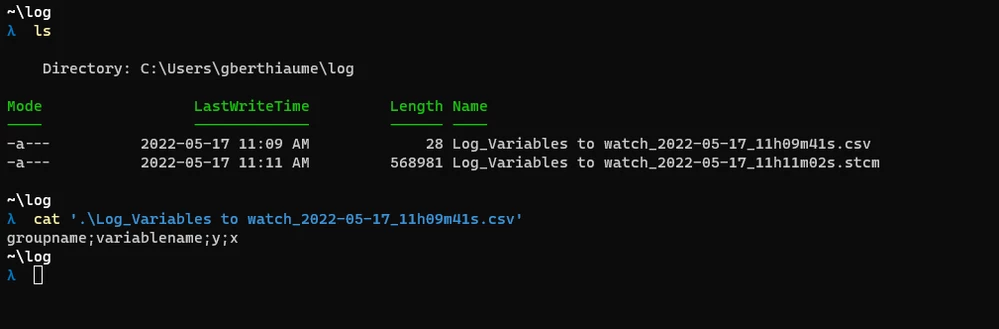
0693W00000Nq7QgQAJ.png 

Am I missing something? Or is this a known bug?

Regards,

Gabriel

This topic has been closed for replies.
Best answer by Richard.Chvr

Hello @GBert.2​ ,

The problem comes from the '.' character in the variable name, will be solved in the next release.

Regards

5 replies

Richard.Chvr
Technical Moderator
June 2, 2022

Hello @GBert.2​ 

Could not reproduce this issue on STM32CubeMonitor v1.4.0 on windows. can you tell us a bit more about your configuration (os...)

To give better visibility on the answered topics, please click on Accept as Solution on the reply which solved your issue or answered your question.
GBert.2
GBert.2Author
Senior
June 9, 2022

Hi @Richard.Chvr​ .

I checked again today with

  • My computer
  • My colleague's computer
  • My client'S computer

Everytime, STM32CubeMonitor produce empty csv file.

I'm not sure what's the problem.

Here is some info:

STM32CubeMonitor: version 1.4.0

OS: Windows 10 Pro [64-bit]

ST-Link: V3-E (SWD, 24000kHz)

ST-Link Firmware: V3.J9

0693W00000NrWONQA3.png 

0693W00000NrWOcQAN.png 

Let me know If I'm missing something.

Thank you.

Richard.Chvr
Technical Moderator
June 23, 2022

Hello

You're flow and configuration looks OK to me, quite strange behavior...

You can duplicate your processing node, one using stm output , other csv and check. If stm file is not empty and csv is, there's an issue on ST side to be investigated.

To give better visibility on the answered topics, please click on Accept as Solution on the reply which solved your issue or answered your question.
Richard.Chvr
Richard.ChvrBest answer
Technical Moderator
July 28, 2022

Hello @GBert.2​ ,

The problem comes from the '.' character in the variable name, will be solved in the next release.

Regards

To give better visibility on the answered topics, please click on Accept as Solution on the reply which solved your issue or answered your question.
GBert.2
GBert.2Author
Senior
July 28, 2022

Hi @Richard.Chvr​ 

Thanks for the feedback.

I was wondering what was happening.

Looking forward to the next release.

Regards,

Gabriel