Skyko
Associate II
August 24, 2023
Question

CubeMonitor: probe declaring [not connected ! Device not opened (5)]

  • August 24, 2023
  • 3 replies
  • 1665 views
  • Nucleo-L152RE with ST-Link board still attached and power from USB
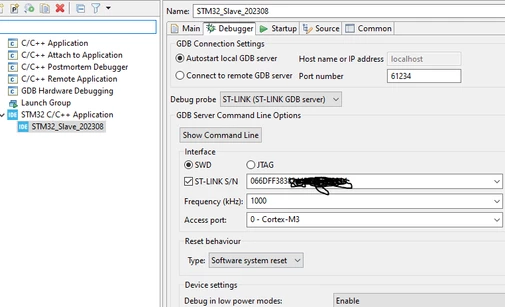
  • STM32CubeIDE configured as picture.  Freq at 1000K to match slow speed set in the Monitor
Skyko_0-1692842197308.png

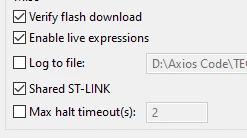
  • Also Debug Config has ST-Link Shared

Skyko_1-1692842387432.png

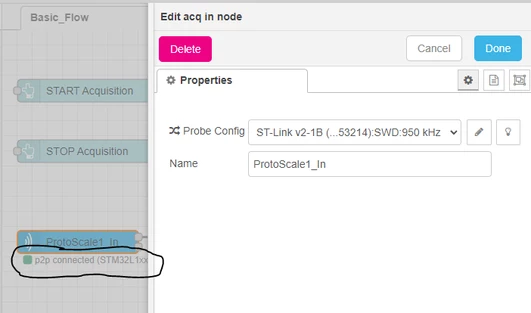
STMCubeMonitor has the probe set up like this:
Skyko_2-1692843816729.png

... it's connected and everything.

However, when I launch the debugger from CubeIDE, or I launch from CubeProgrammer, the probe immediately goes red with the [not connected ! Device not opened (5)]

In my attempts to fix this myself, I added this to my code:

#define DEBUGGER_ON 1 //REMOVE BEFORE FLIGHT

#define LOW_POWER_DISABLE 1 //REMOVE BEFORE FLIGHT

In my attempts to fix this myself, I also tried flashing my program onto the STM using CubeProgrammer.  I had the same effect.  While the CubeProg was attached my program ran but CubeMon said the Device was not open.  I would close CubeProgrammer and the program would stop but CubeMon finally found my device.

I'm clearly in need of better understanding.  My guess is ST-Link is not sharing very well.  Any suggestions would be greatly, greatly appreciated.

    This topic has been closed for replies.

    3 replies

    Richard.Chvr
    Technical Moderator
    August 31, 2023

    Hello @Skyko 


    Did you install STLink_server ?

    To give better visibility on the answered topics, please click on Accept as Solution on the reply which solved your issue or answered your question.
    Skyko
    SkykoAuthor
    Associate II
    September 1, 2023

    Thx for the reply @Richard.Chvr!  Yes, it is installed properly with the latest revision as shown below.Skyko_0-1693587425747.png


    Richard.Chvr
    Technical Moderator
    September 7, 2023

    HI @Skyko 

    I finally open my eyes and see your configuration is p2p whilst it should be tcp. You also need to configure STM32CubeMonitor in shared mode:

     https://wiki.st.com/stm32mcu/wiki/STM32CubeMonitor:How_to_configure_shared_mode

    To give better visibility on the answered topics, please click on Accept as Solution on the reply which solved your issue or answered your question.