

PCu1
Senior
July 17, 2020
Solved

filter or routing variables to UI

  • July 17, 2020
  • 2 replies
  • 784 views

Hello,

I think it is a basic question but I can't find a solution.

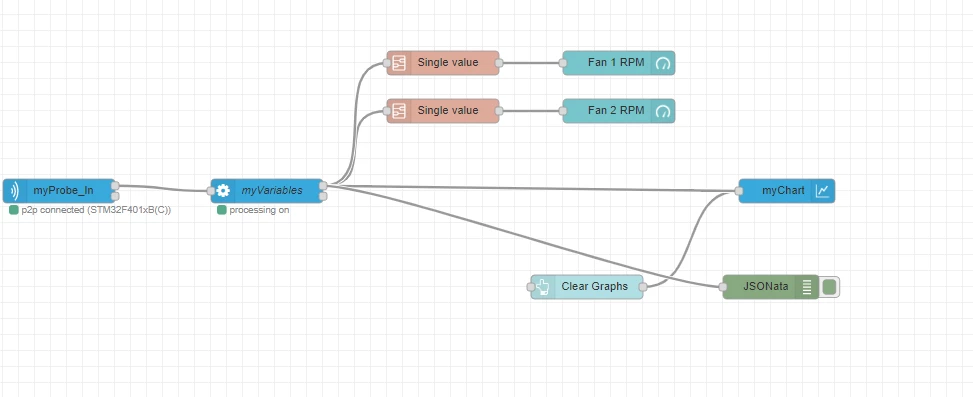
I read 4 variables, 2 fan RPM and 2 temperatures.

I route the two RPM to a gauge, and I would like the temperature to a char (only the temperature). Because the scale is very different.

Gauge is working, I can filter.

I don't know what to insert between "processing" and "chart" to remove the RPM variables to the chart:
0693W000001t5BmQAI.png

Thank you,

Pierre

This topic has been closed for replies.
Best answer by stephane.legargeant

Hello Pierre

There are 2 options :

  • Create 2 groups of variables, one for the gauge and one for the chart. You will have 2 processing nodes, and one can be connected to the gauge, the other to the chart.
  • Add some filtering nodes on the output of myVariables processing node. The "switch" node in the palette will do the job, filter on the property msg.payload.variablename and set == myVariable

The switch node configuration : (Copy this code, go to menu "import" and paste the code. then replace "myVariable" by your variable name)

[
 {
 "id": "2ca79e6f.a68e72",
 "type": "switch",
 "z": "8bf74b4c.0fa5f8",
 "name": "filter variable",
 "property": "payload.variablename",
 "propertyType": "msg",
 "rules": [
 {
 "t": "eq",
 "v": "myVariable",
 "vt": "str"
 }
 ],
 "checkall": "true",
 "repair": false,
 "outputs": 1,
 "x": 630,
 "y": 220,
 "wires": [
 [
 "b9d7ae86.0da72"
 ]
 ]
 }
]

Best regards

Stephane

2 replies

stephane.legargeant
ST Employee
July 17, 2020

Hello Pierre

There are 2 options :

  • Create 2 groups of variables, one for the gauge and one for the chart. You will have 2 processing nodes, and one can be connected to the gauge, the other to the chart.
  • Add some filtering nodes on the output of myVariables processing node. The "switch" node in the palette will do the job, filter on the property msg.payload.variablename and set == myVariable

The switch node configuration : (Copy this code, go to menu "import" and paste the code. then replace "myVariable" by your variable name)

[
 {
 "id": "2ca79e6f.a68e72",
 "type": "switch",
 "z": "8bf74b4c.0fa5f8",
 "name": "filter variable",
 "property": "payload.variablename",
 "propertyType": "msg",
 "rules": [
 {
 "t": "eq",
 "v": "myVariable",
 "vt": "str"
 }
 ],
 "checkall": "true",
 "repair": false,
 "outputs": 1,
 "x": 630,
 "y": 220,
 "wires": [
 [
 "b9d7ae86.0da72"
 ]
 ]
 }
]

Best regards

Stephane

PCu1
PCu1Author
Senior
July 24, 2020

Hi Stéphane,

Thank you for the answer.

For the first solution I had tried before but without success. I will try again.

For the second solution It works. But it seems that I need to add a filter for each variable. A single filter with multiple variables does not work.

0693W000003BDdZQAW.png

Pierre