Associate
April 2, 2025
Solved

Issue with Missing Acquisition Nodes in STM32CubeMonitor

  • April 2, 2025
  • 1 reply
  • 623 views

Hello,

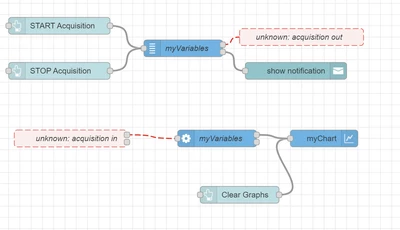
I am experiencing an issue with STM32CubeMonitor on Windows 11 where some nodes, including acquisition out, are marked as "not found" and cannot be used.

I have found similar reports from other users:

https://community.st.com/t5/stm32cubemonitor-mcus/cubemonitor-acquitions-installing/td-p/660215

https://community.st.com/t5/stm32cubemonitor-mcus/missing-acquisition-nodes-on-macos/td-p/644151

I have tried the suggested solutions, such as running stlinkserver, but the issue persists. After starting stlinkserver, is there any additional setup required?

Has anyone solved this issue using a different approach?
Are there any additional steps required after starting stlinkserver?

Environment:

  • OS: Windows 11

  • STM32CubeMonitor Version:1.10.0


Aiku_0-1743630018138.png

    Best answer by Aiku

    Thank you for your support!

    I finally solved the issue. The root cause was the lack of Visual C++ Redistributable libraries.
    After installing the packages (I installed versions 2005, 2008, 2010, 2012, 2013, 2015–2022), the missing shared library error disappeared, and the problematic acquisition nodes started working correctly.

    Hopefully, this helps others who face the same issue!

    1 reply

    Richard.Chvr
    Technical Moderator
    April 30, 2025

    Did you update from an older STM32CubeMonitor version or from scratch?

    Did you try uninstall/Install ?

    If still issue, can you launch STM32CubeMonitor.exe in a terminal a send the log.

    Thanks

    To give better visibility on the answered topics, please click on Accept as Solution on the reply which solved your issue or answered your question.
    AikuAuthorBest answer
    Associate
    May 1, 2025

    Thank you for your support!

    I finally solved the issue. The root cause was the lack of Visual C++ Redistributable libraries.
    After installing the packages (I installed versions 2005, 2008, 2010, 2012, 2013, 2015–2022), the missing shared library error disappeared, and the problematic acquisition nodes started working correctly.

    Hopefully, this helps others who face the same issue!