EKokk
Associate
December 17, 2018
Question

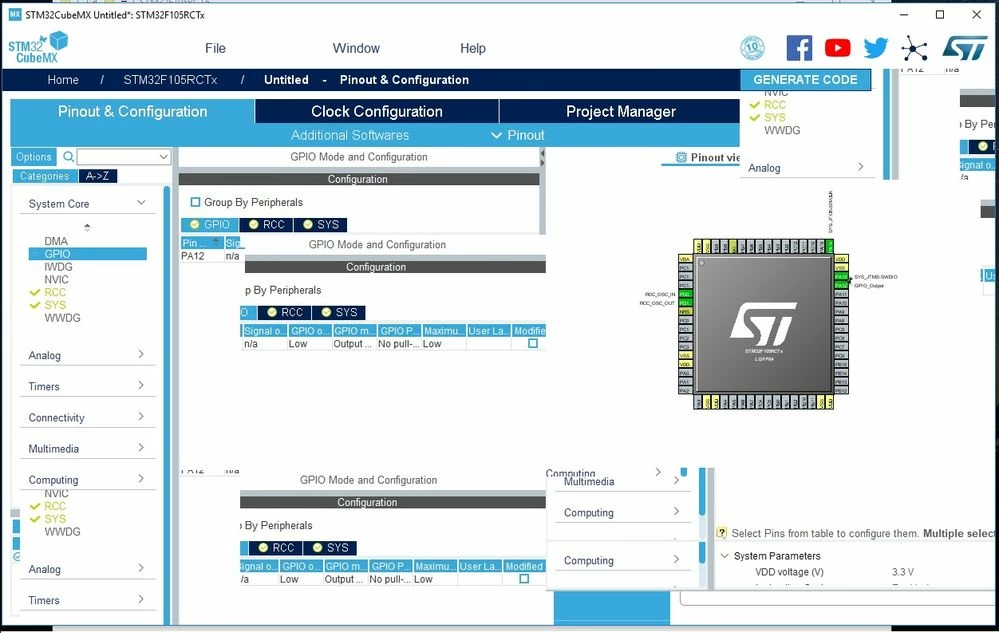
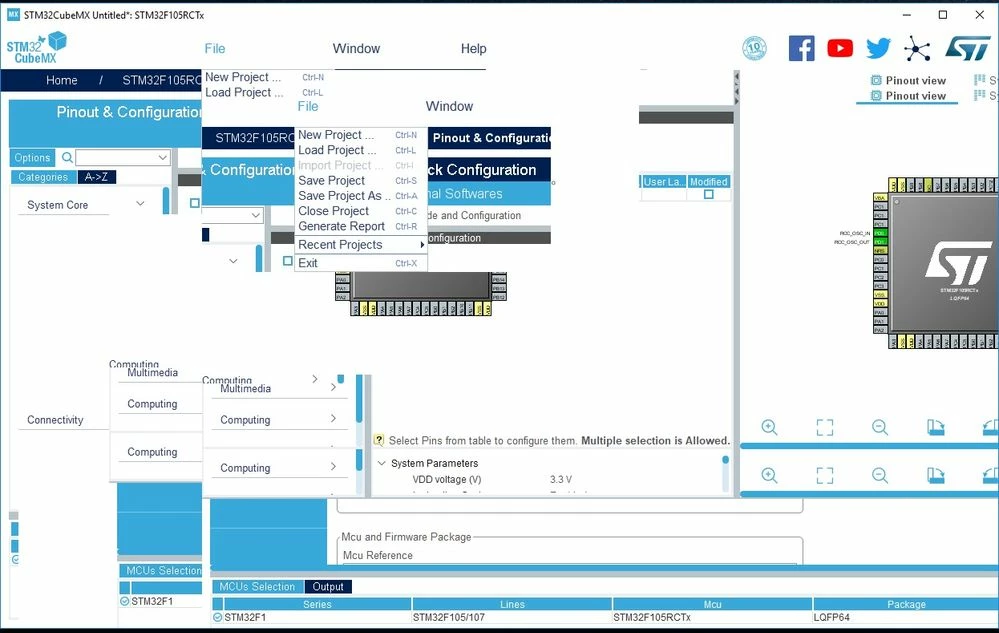
My CubeMX UI is messed up.

  • December 17, 2018
  • 13 replies
  • 5764 views

I do apologize if this is in wrong section or something. I just don't have time to spend hours looking for correct place to get support. I need to work, not fiddle with misbehaving software.

The issue I am having is that CubeMX (latest version from the website) is totally messed up in my desktop PC with windows 10. Everything works fine on my windows 7 laptop.

One picture tells more than a thousand words so here are two.
0690X000006CqcAQAS.jpg0690X000006Cqc5QAC.jpg

It's totally unusable. Never seen this kind of behavior with any software I am using in my windows 10 desktop.

All help is very much appreciated, and sorry again if this is in wrong section.

This topic has been closed for replies.

13 replies

andy2399
Senior
December 17, 2018

You should post it under the STM32CubeMX group.

https://community.st.com/s/topic/0TO0X000000BTr8WAG/detail

There are plenty of dissatisfied customers over there !

Looks like the application was written by a high school pupil with no regard to standard UI practices!

andy2399
Senior
December 17, 2018

You should post it under the STM32CubeMX group.

https://community.st.com/s/topic/0TO0X000000BTr8WAG/detail

There are plenty of dissatisfied customers over there !

Looks like the application was written by a high school pupil with no regard to standard UI practices!

andy2399
Senior
December 17, 2018

You should post it under the STM32CubeMX group.

https://community.st.com/s/topic/0TO0X000000BTr8WAG/detail

There are plenty of dissatisfied customers over there !

Looks like the application was written by a high school pupil with no regard to standard UI practices!

andy2399
Senior
December 17, 2018

You should post it under the STM32CubeMX group.

https://community.st.com/s/topic/0TO0X000000BTr8WAG/detail

There are plenty of dissatisfied customers over there !

Looks like the application was written by a high school pupil with no regard to standard UI practices!

andy2399
Senior
December 17, 2018

This forum software is just as useless as the STM32CubeMX software - hence the multiple posts :sad_but_relieved_face: .

I love ST hardware but their software ***** !

AvaTar
Senior III
December 17, 2018

In the meantime, experimenting with Java versions might be worthwile.

The "Run in compatibility mode" might not be appropriate for such an Java application.

I'm no Cube user, by the way (refusenik) ...

Mon2
Senior III
December 17, 2018

Hi. Been working with the latest tool, daily (8+ hours) for the past 3 weeks and it is far from perfect but have it now stabilized for our target usage. For your GUI issue, check your video resolution to see if that corrects the problem. Also, are you locking a font size for your text? For example, if possible, select the highest screen resolution for your hardware and launch this tool again to see if it helps. If required, enter Add/Remove Programs -> uninstall the toolchain and then reboot and install a fresh copy again. Post your results. We are using on Windows 7 64 bit and have not seen the same issue / fault. Can test on a Windows 10 box if required upon reaching the office.

EKokk
EKokkAuthor
Associate
December 17, 2018

Thank you for everybody for their swift answers. I now see that I am using older version on my laptop, so I will probably revert to that on my desktop. I will also check my that my java is up to date.

I have not messed with the font size or settings, they are default from windows installation. Resolution is also set to 1680x1050 (native resolution of my dual monitors). Now that I come to think of it, it may come down to my monitor setup as IIRC the other one is connected to IGP and other to my graphics card.

It's just frustrating when you should be working and not spending time fiddling with unfinished software. Maybe the best solution would be memorizing the HAL API and just forget the CubeMX all together, but I am somewhat lazy in that sense.

I have had no issues with version 4.27.0 and windows 7, and I am used to having certain workflow with it. Well maybe it's time to evolve it a bit.

Have a nice Christmas everybody!

AvaTar
Senior III
December 17, 2018

Still, such a gross misbehavior of the application shows the (inadequate) level of testing and validation done on ST's side. Different screen resolutions are unavoidable for GUI applications on a PC.

Nawres GHARBI
Technical Moderator
December 18, 2018

Hi @EKokk​ 

Could you please tell me more about your setup

java version

Windows version (32 or 64 bit)

screen size

Resolution already shared in your previous message 1680x1050

Ram Size and how much RAM is free when you got this behavior

EKokk
EKokkAuthor
Associate
December 19, 2018

Hi,

thank you for your reply.

It's AMD Athlon II x 250, 8GB RAM, Radeon 5770, 256GB SSD, Windows 10 64-bit.

I am at work trip for a week or so and can't access the computer to check the java version or RAM usage.

I mostly work on my laptop, but I am in process to upgrading my old laptop (windows 7) to new one with windows 10 and I was using my desktop computer (windows 10) to test if I can get all of my software tools working in windows 10 environment, so I can minimize possible issues beforehand.

Also IIRC the other display is connected to the motherboard IGP, which is Nvidia chip, so this can have an effect also. I think it's best that I run some deeper test when I get back home, like connecting both of the displays back to the Radeon and updating my java, to see if the issue is solved.

I will report my progress here.

Have a happy Christmas for every one!