Karl Yamashita
Principal
March 18, 2026
Solved

CubeMX2 code generation issues

  • March 18, 2026
  • 2 replies
  • 1066 views

Yesterday I was able to generate a cmake project which included main.c/h files. I opened the project in VS Code but had errors trying to build. I had VS code fix the errors so now I am able to build the project.

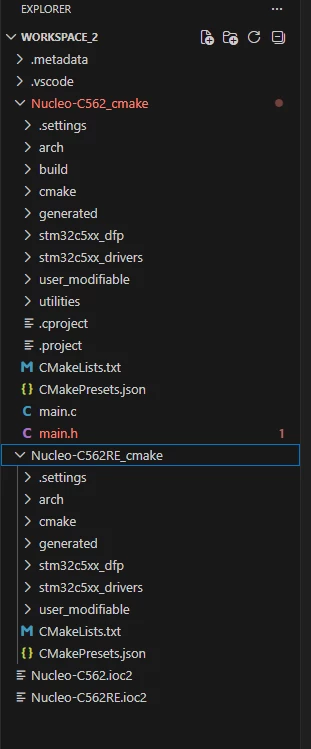
  • Today, I generated another project but the main.c/h files are missing as seen in the screen shot.
  • I've timed the project generation and it takes 3 minutes to generate a project. Why so long?
  • Why are the IOC files created outside of the project folder?


Screenshot 2026-03-18 140335.png


Best answer by Karl Yamashita

I checked the path and it was set for "cmake" instead of "cube-cmake", so updated it. 

When building the project i got different errors

[cmakeExecutable] CMake executable not found in cache. Checking again.
[proc] Executing command: cube-cmake --version
[proc] The command: cube-cmake --version failed with error: Error: spawn cube-cmake ENOENT
[proc] Executing command: cube-cmake -E capabilities
[proc] The command: cube-cmake -E capabilities failed with error: Error: spawn cube-cmake ENOENT
[main] Building folder: Nucleo-C562RE_Test_cmake 
[cmakeExecutable] CMake executable not found in cache. Checking again.
[proc] Executing command: cube-cmake --version
[proc] The command: cube-cmake --version failed with error: Error: spawn cube-cmake ENOENT
[proc] Executing command: cube-cmake -E capabilities
[proc] The command: cube-cmake -E capabilities failed with error: Error: spawn cube-cmake ENOENT
[rollbar] Unhandled exception: Unhandled Promise rejection: build Error: Build failed: Unable to configure the project {}

I had the VS Code agent fix it. It added a wrapper "cube-cmake.cmd" which created this text

@Echo off
"%~dp0cube.exe" cmake %*

But it still had the same build error. Then I had the agent try to fix again and it create a settings.json file and added a path.
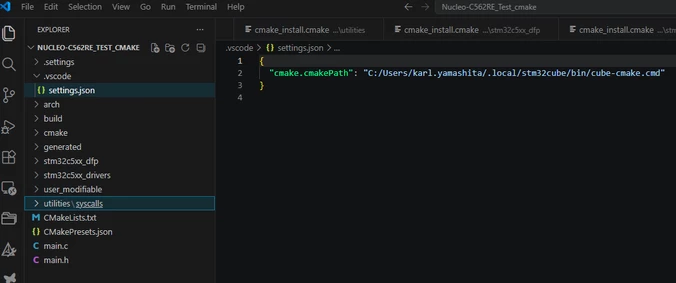
Screenshot 2026-03-27 121253.png

So now I am able to build the project with zero errors.



2 replies

ST Employee
March 18, 2026

Hi @Karl Yamashita 


With VS Code no need to open the folder with the .ioc2 file, just open the '_cmake' project folder.

Can you please share the cmake_project folder and .zip issue reporter so we can check the error?

Karl Yamashita
Principal
March 18, 2026

Well the problem is when I want to create a repository for the cmake project folder, the IOC file is not included. 


I've attached the zip file and included the IOC file


If a reply has proven helpful, click on Accept as Solution so that it'll show at top of the post.CAN Jammer an open source CAN bus hacking toolCANableV3 Open Source
ST Employee
March 19, 2026

Hi @Karl Yamashita 

How did you create the attached IOC2? 
Could you please open pack manager and send me a screenshot displaying the "Up To date" packs?

ST Employee
March 27, 2026

Hi @Karl Yamashita 

Yes, for the Cube bundle, all bundles are now up to date.
What you need to do is check the CMake path in the VS Code settings and set it to "cube-cmake" as shown:

Screenshot.png

Karl Yamashita
Karl YamashitaAuthorBest answer
Principal
March 27, 2026

I checked the path and it was set for "cmake" instead of "cube-cmake", so updated it. 

When building the project i got different errors

[cmakeExecutable] CMake executable not found in cache. Checking again.
[proc] Executing command: cube-cmake --version
[proc] The command: cube-cmake --version failed with error: Error: spawn cube-cmake ENOENT
[proc] Executing command: cube-cmake -E capabilities
[proc] The command: cube-cmake -E capabilities failed with error: Error: spawn cube-cmake ENOENT
[main] Building folder: Nucleo-C562RE_Test_cmake 
[cmakeExecutable] CMake executable not found in cache. Checking again.
[proc] Executing command: cube-cmake --version
[proc] The command: cube-cmake --version failed with error: Error: spawn cube-cmake ENOENT
[proc] Executing command: cube-cmake -E capabilities
[proc] The command: cube-cmake -E capabilities failed with error: Error: spawn cube-cmake ENOENT
[rollbar] Unhandled exception: Unhandled Promise rejection: build Error: Build failed: Unable to configure the project {}

I had the VS Code agent fix it. It added a wrapper "cube-cmake.cmd" which created this text

@Echo off
"%~dp0cube.exe" cmake %*

But it still had the same build error. Then I had the agent try to fix again and it create a settings.json file and added a path.

Screenshot 2026-03-27 121253.png

So now I am able to build the project with zero errors.



If a reply has proven helpful, click on Accept as Solution so that it'll show at top of the post.CAN Jammer an open source CAN bus hacking toolCANableV3 Open Source
ST Employee
March 30, 2026

Hi @Karl Yamashita 

Nice, to hear it’s working now and that the issue is fixed!

Thanks for sharing what you did too, this will be useful for others who hit the same problem.