

gil_dobjanschi
Associate II
April 27, 2026
Solved

Starting a new project with an existing ioc2 file

  • April 27, 2026
  • 2 replies
  • 81 views

Hello,


I would like to learn if there is an easy way in STM32CubeMX2 to start a new project with an existing ioc2 file. It seems that the only way I can do this is make a copy of the ioc2 file, do a text find and replace for the name of the project and reopen the project in MX2.

In essence, I like to start a project from a working ioc2 configuration and modify it to work on a fork of the project. I don't want to recreate a complex configuration from scratch because I found the hard way that it is easy to make mistakes or to omit something.


Thank you,

-Gil


Best answer by STackPointer64

Hello,

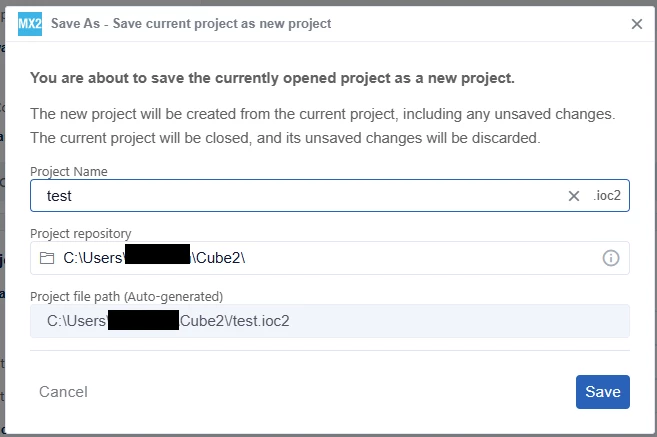
You can open the working ioc2 configuration and click Project > Save As. You will then be prompted to enter a new project name and a new directory.

STackPointer64_0-1777310756601.png

Best regards,

2 replies

STackPointer64Best answer
Technical Moderator
April 27, 2026

Hello,

You can open the working ioc2 configuration and click Project > Save As. You will then be prompted to enter a new project name and a new directory.

STackPointer64_0-1777310756601.png

Best regards,

To improve visibility of answered topics, please click 'Accept as Solution' on the reply that resolved your issue or answered your question.
gil_dobjanschi
Associate II
April 27, 2026

Thank you @STackPointer64!