
AMend.7
Associate III
April 6, 2026
Solved

STM32C5 using STM32CubeIDE

  • April 6, 2026
  • 3 replies
  • 310 views

Hi,

How do I generate a project for STM32CubeIDE using STM32cubeMX2? Apparently, the only options are cmake, IAR, and open-cmsis (Keil). And is it possible to open examples from STM32CubeC5 using STM32CubeIDE?

Ari

Best answer by Karl Yamashita

Import the generated CMake project from CubeMX2 as a "STM32 CMake Project"
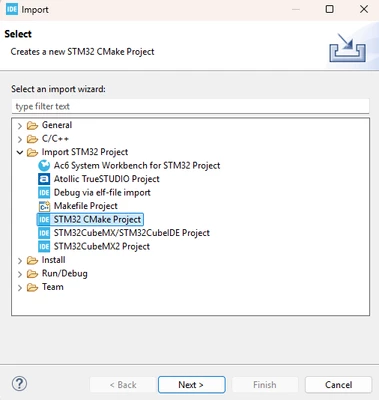
 

Screenshot 2026-04-06 122232.png

3 replies

Bouraoui Chemli
ST Employee
April 6, 2026

To generate a project for STM32CubeIDE using STM32CubeMX, you must select STM32CubeIDE as the Toolchain/IDE in the Project Manager | Code Generator section. If you only see options like CMake, IAR ..., and not STM32CubeIDE, this is likely due to limitations in your CubeMX installation.

If you have generated a CMake project with STM32CubeMX, you can import it directly into STM32CubeIDE as a CMake project. For detailed guidance, refer to the application note on using CMake in STM32CubeIDE: AN5952

AScha.3
Super User
April 6, 2026
AMend.7
AMend.7Author
Associate III
April 6, 2026

Hi,

 I asked how to open a project generated by STM32CubeMX2 (STM32C5) or an example from STM32CubeC5 in STM32CubeIDE 2.1.1.

Thanks,

 Ari

Karl Yamashita
Karl YamashitaBest answer
Principal
April 6, 2026

Import the generated CMake project from CubeMX2 as a "STM32 CMake Project"


Screenshot 2026-04-06 122232.png

If a reply has proven helpful, click on Accept as Solution so that it'll show at top of the post.CAN Jammer an open source CAN bus hacking toolCANableV3 Open Source