
Solved
Can't read or erase flash anymore NUCLEO-WB15CC
I am working with a NUCLEO-WB15CC, and it seems that I can't read or write anymore. When I connect via ST-Link in STM32CubeProgrammer (v2.14.0) I just get
Error: Data read failed
When I try to read registers, I get the same error.
I also can't erase the chip:
Error: Mass erase operation failed.Please verify flash protection
RDP option byte is AA, so that can't be the problem.
For write protection, I don't really remember what the default values was, but they are: 0xff, 0x0, 0xff, 0x0,
I can still see target information in Programmer but nothing else seems to work, have I bricked the chip?
Edit: I noticed I also can't read registers via the CLI, so maybe it's not a bug in STM32CubeProgrammer.
This is the command I used:
STM32_Programmer_CLI.exe" -c port=SWD -r32 0x08000000 0x4
Which results in
Error: failed to read the requested memory content
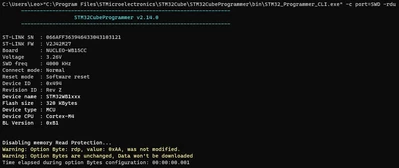
Read protection seems to be disabled:
Here are all the option bytes:
OPTION BYTES BANK: 0

 Read Out Protection:

 RDP : 0xAA (Level 0, no protection)

 BOR Level:

 BOR_LEV : 0x0 (BOR Level 0 reset level threshold is around 1.7 V)

 User Configuration:

 nBOOT0 : 0x1 (nBOOT0=1)
 nBOOT1 : 0x1 (Boot from code area if BOOT0=0 otherwise system Flash)
 nSWBOOT0 : 0x0 (BOOT0 taken from the option bit nBOOT0)
 SRAM2RST : 0x1 (SRAM2 is not erased when a system reset occurs)
 SRAM2PE : 0x1 (SRAM2 parity check disable)
 nRST_STOP : 0x1 (No reset generated when entering the Stop mode)
 nRST_STDBY : 0x1 (No reset generated when entering the Standby mode)
 nRSTSHDW : 0x1 (No reset generated when entering the Shutdown mode)
 WWDGSW : 0x1 (Software window watchdog)
 IWDGSTDBY : 0x1 (Independent watchdog counter running in Standby mode)
 IWDGSTOP : 0x1 (Independent watchdog counter running in Stop mode)
 IWDGSW : 0x1 (Software independent watchdog)
 GPIO_MODE_PB11: 0x1 (If RESET_MODE_PB11 = 0: Standard GPIO pad functionality, Only internal RESET possible. If RESET_MODE_PB11 = 1: Bidirectional reset, NRST pin configured in reset input/output mode (default mode), GPIO functionality is not available on PB11.)
 RESET_MODE_PB11: 0x1 (If GPIO_MODE_PB11 = 0: Reset input only, a low level on the NRST pin generates system reset, internal RESET not propagated to the NSRT pin. If GPIO_MODE_PB11 = 1: Bidirectional reset, NRST pin configured in reset input/output mode (default mode).)
 IRH : 0x1 (Internal resets drives NRST pin low until it is seen as low level.)

 ESE:

 ESE : 0x1 (Security enabled)

 PCROP Protection:

 PCROP1A_STRT : 0x1FF (0x807FC00)
 PCROP1A_END : 0x0 (0x8000400)
 PCROP_RDP : 0x0 (PCROP zone is kept when RDP is decreased)
 PCROP1B_STRT : 0x1FF (0x807FC00)
 PCROP1B_END : 0x0 (0x8000400)

 Write Protection:

 WRP1A_STRT : 0x18 (0x800C000)
 WRP1A_END : 0x20 (0x8010000)
 WRP1B_STRT : 0xFF (0x807F800)
 WRP1B_END : 0x0 (0x8000000)
OPTION BYTES BANK: 1

 IPCCDBA-AA:

 IPCCDBA : 0x3FFF (0x20013FFF)
OPTION BYTES BANK: 2

 Security Configuration Option bytes:

 SFSA : 0x0 (0x8000000)
 FSD : 0x0 (System and Flash secure)
 DDS : 0x1 (CPU2 debug access disabled)
 C2OPT : 0x1 (SBRV will address Flash)
 BRSD_B : 0x0 (SRAM2b is secure)
 SBRSA_B : 0x0 (0x20038000)
 BRSD_A : 0x0 (SRAM2a is secure)
 SBRSA_A : 0x0 (0x20030000)
 SBRV : 0x13E00 (0x8000000)