

FPayn.1
Associate III
November 16, 2020
Solved

Can't uninstall STM32Cube Programmer V2.5.0 from Windows 10 laptop
  • November 16, 2020
  • 3 replies
  • 3137 views

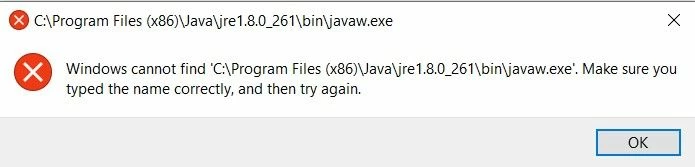
0693W000005BaJpQAK.jpgWhen I use the normal Win10 'Add/Remove' programs utility to uninstall ST32Cube Programmer, I get the following error

"Windows cannot find 'C:\Program Files (x86)\Java\jre1.8.0_261\bin\javaw.exe'. Make sure you typed the name correctly, and then try again." (see attached image).

I don't have any current need for the STM32Cube Programmer, so I'd like to get rid of it for the time being - how do I do that?

TIA,

Frank

This topic has been closed for replies.
Best answer by Peter BENSCH

You have probably already uninstalled this Java version with which the STM32CubeProgrammer was installed. However, you can of course uninstall the STM32CubeProgrammer manually:

  • create a text file using notepad, e.g. c:\users\public\xyz.reg, with the following content:
Windows Registry Editor Version 5.00
[-HKEY_LOCAL_MACHINE\SOFTWARE\Microsoft\Windows\CurrentVersion\Uninstall\STM32CubeProgrammer 2.5.0]
  • start cmd using admin rights
  • enter the command:
    • regedit c:\users\public\xyz.reg ...yes, you are sure to continue... --> should return a message box: The keys and values... added to the registry.
  • remove the STM32CubeProgrammer folder:
    • rmdir /s /q "C:\Program Files\STMicroelectronics\STM32Cube\STM32CubeProgrammer25"
  • remove the startmenu entries:
    • del /q "C:\ProgramData\Microsoft\Windows\Start Menu\STM32CubeProgrammer25.lnk"
    • del /q "C:\Users\All Users\Microsoft\Windows\Start Menu\STM32CubeProgrammer25.lnk"
  • remove the reg file if done successfully:
    • del /q c:\users\public\xyz.reg
  • exit admin mode

That's it!

When your question is answered, please close this topic by choosing Select as Best.

Good luck!

/Peter

3 replies

Peter BENSCH
Peter BENSCHBest answer
Technical Moderator
November 17, 2020

You have probably already uninstalled this Java version with which the STM32CubeProgrammer was installed. However, you can of course uninstall the STM32CubeProgrammer manually:

  • create a text file using notepad, e.g. c:\users\public\xyz.reg, with the following content:
Windows Registry Editor Version 5.00
[-HKEY_LOCAL_MACHINE\SOFTWARE\Microsoft\Windows\CurrentVersion\Uninstall\STM32CubeProgrammer 2.5.0]
  • start cmd using admin rights
  • enter the command:
    • regedit c:\users\public\xyz.reg ...yes, you are sure to continue... --> should return a message box: The keys and values... added to the registry.
  • remove the STM32CubeProgrammer folder:
    • rmdir /s /q "C:\Program Files\STMicroelectronics\STM32Cube\STM32CubeProgrammer25"
  • remove the startmenu entries:
    • del /q "C:\ProgramData\Microsoft\Windows\Start Menu\STM32CubeProgrammer25.lnk"
    • del /q "C:\Users\All Users\Microsoft\Windows\Start Menu\STM32CubeProgrammer25.lnk"
  • remove the reg file if done successfully:
    • del /q c:\users\public\xyz.reg
  • exit admin mode

That's it!

When your question is answered, please close this topic by choosing Select as Best.

Good luck!

/Peter

FPayn.1
FPayn.1Author
Associate III
November 18, 2020

Thanks for the quick reply. Unfortunately my setup did not conform fully to your scripts, but it was close enough so I could follow it ;-). In most places, instead of 'STM32CubeProgrammer25' it was 'STM32CubeProgrammer'. The reg script didn't do anything, but the registry location allowed me to do it myself

I can't believe you guys built an uninstall program that depends on a specific version of java

Frank

Peter BENSCH
Technical Moderator
November 18, 2020

Good to know it worked for you.

Regarding Java: the STM32CubeProgrammer is a huge project indeed, so it will take (took some) time to change its basic layer. But you can look forward - the next version of STM32CubeProgrammer will embed its own Java, so stay tuned.

<edit>

The new CubeProgrammer has arrived - see here!

</edit>

/Peter