JLee.00000
Associate III
January 14, 2022
Solved

connect error ST-LINK on 'STM32H7XI-DISCO'

  • January 14, 2022
  • 2 replies
  • 2498 views

I can't connect the STM32H7XI-disco board with the PC.

At first, it was connected through ST-Link.

I connected to the PC using a micro Btype cable to ST-LINK V3E (CN2) on the board.

However, it is not connected after the wrong version of download.

I want to know how to initialize or bypass the board to put in a normal program.

I will explain the current state and process of this.

This was a project created from "STM32Cube" on "STM32CubeIDE".

I modified the clock through the .ioc file, and after the correction, the project was built with all the error-prone parts disabled, such as the DCMI in 'image_3.'

At that time, set BCM4:1 and BCM7:0 from STM32CubrProgrammer

and download built project to MCU.

 If you refer to 'image_4, you can see that it is properly recognized on the PC.

However, errors such as 'image_1' and 'image_2' occur.

I hope we can connect it again somehow.

Thank you for your help.
This topic has been closed for replies.

2 replies

TDK
Super User
January 14, 2022

Try changing the mode to connect under reset.

"If you feel a post has answered your question, please click ""Accept as Solution""."
JLee.00000
Associate III
January 17, 2022

I tried. but I don't found solution.

0693W00000JM9fcQAD.png0693W00000JM9fmQAD.png 

0693W00000JM9fXQAT.png

JLee.00000
Associate III
January 17, 2022

I solved it.

set 'Under​ reset' of Mode,

'Hardware reset' for Reset Mode

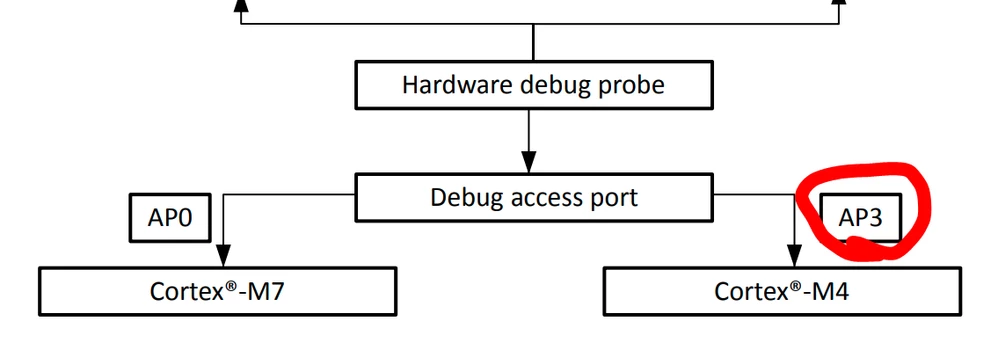
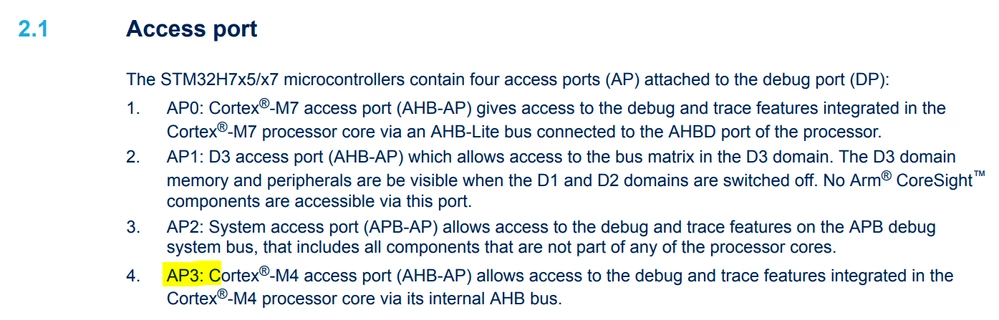
and Access port is '3'.

That was important key of this solution.

but I don't know how change to 3 that Access port ​

who that know anytime, teach me anything of this problem.

TDK
Super User
January 17, 2022
Access port 3 is for the the M4 core.
"If you feel a post has answered your question, please click ""Accept as Solution""."
JLee.00000
Associate III
January 18, 2022

ah! by any chance, can I find that contents in the manual or somewhere?