
Associate
June 5, 2024
Solved

DFU mode read out protection

  • June 5, 2024
  • 8 replies
  • 5011 views

Hello, 

I am trying to connect to the STM32F072C8T6 microcontroller via USB in the STM32CubeProgrammer, however I am getting:

"Device is under read out protection ! If you want to disable RDP please reconnect with Read Unprotect enabled"
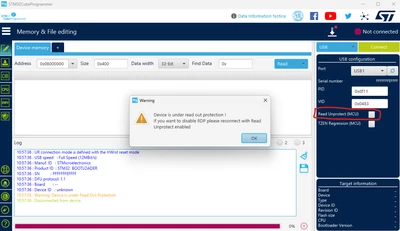
Draxter_0-1717577911683.png

So, when I check the Read Unprotect (MCU) checkbox, I get:

"Please Power off Power on your device."
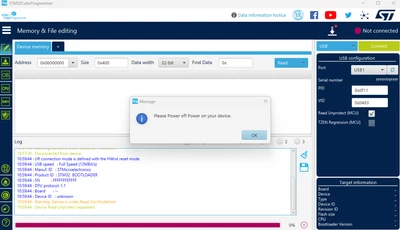
Draxter_1-1717578006569.png

After turning the power off/on, I see the same messages. I cannot connect to the MCU via USB in the STM32CubeProgrammer.

I have tried different versions of STM32CubeProgrammer:

  • v2.16.0
  • v2.15.0
  • v.2.13.0
  • v.2.10.0
  • v.2.8.0

Moreover I tried on second computer with Windows 11 and I have the same issue.

I'm trying to connect my custom board, but I also checked another hardware board (BluePill ) with the same STM32F072C8T6 MCU and it doesn't work either.

Interestingly, using the DFU-util v0.8 program I can connect to the MCU and successfully read/write memory:
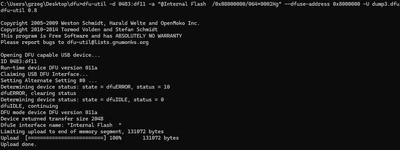
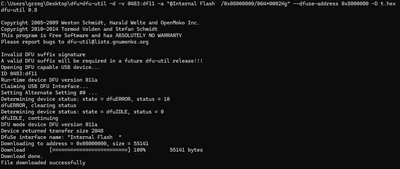
Draxter_1-1717580537175.png

Draxter_0-1717580509580.png


Best answer by Amine_Jridi

Hello @Draxter 

Regarding this issue, we are aware of it and it's currently under investigation.

Internal ticket number: 171192 (This is an internal tracking number and is not accessible or usable by customers).

As a workaround, we suggest connecting your MCU using a HUB instead of plugging it directly into the PC.

Thanks,

Amine.

8 replies

Amine_Jridi
Amine_JridiBest answer
Technical Moderator
June 7, 2024

Hello @Draxter 

Regarding this issue, we are aware of it and it's currently under investigation.

Internal ticket number: 171192 (This is an internal tracking number and is not accessible or usable by customers).

As a workaround, we suggest connecting your MCU using a HUB instead of plugging it directly into the PC.

Thanks,

Amine.

In order to give better visibility on the answered topics, please click on 'Accept as Solution' on the reply which solved your issue or answered your question.
Explorer
July 30, 2024

Hello Amine,

Is there any progress on this issue?

I'm using v2.17.0 and I have the same symptoms on my DELL when I plug STM32F0 board on the laptops USB-C ports.

If I use a USB C to A cable on my USB hub, it works. If I use a USB C to A plug converter, then its the same as using a USB C cable.


BR

DraxterAuthor
Associate
August 4, 2024

@new_earth75 answer from STMicroelectronics support:


In fact, the issue is coming from the USB bootloader state machine which hangs and stuck in busy state.

This issue is seen only on recent machines with high speed USB controllers, and putting a hub resolves the issue.

Other possible solutions :

- Using dfuse

- Using connectors downgrading the USB speed then putting some more latency in the transmission to make it work

DraxterAuthor
Associate
June 14, 2024

@Amine_Jridi thank you. Connecting the board to an external USB HUB solves the problem.


Draxter_0-1718344291502.png


We are unable to understand what is root cause. Why use a USB HUB instead of a direct connection to a computer?

Associate
September 30, 2024

Hello,

We also are very interested in the progress in this matter, since we experience the exact same thing. Our hardware though is using the STM32L552. 

Associate
September 30, 2024

...I can also add that we've been doing tests on

  • Win 10
  • Win 11
  • Ubuntu

We get the same problem in all 3 environments when connecting the device directly to the computer, but can conclude that in Linux things works much better compared to Windows, but eventually also fails and reboots there. In Windows the problem occurs only on a random set of computers, and most of them are using Win 10, but it does happen on some Win 11 computers as well. On our Linux machines the errors happen more rarely, but they do occur every now and then. 

All in all we get rid of the problem when using a USB-Hub in between the device and the computer. 

Explorer
September 30, 2024

Yes its quite common on newer machines. The machines that are affected on our side are the ones that support Thunderbold or USB4. I guess the fact that the USB is handled directly by the CPU rather than some chipset with integrated USB hub is the issue.

I asked about this issue in the v2.17.0 release thread but of course there is no answer. The dont aknowledge this in the known issues part of the patch notes either.

I dont care that a USB 2.0 hub solves the issue! Honestly I find distressing that the timings in ST's software rely on the USB controllers latency to work. Man we've got production lines to build and we get this to work with... What's next? Will we need a PS/2 mouse to click on the buttons and a parallel port to remove Write Protection?

My newer machines use dfuse and it seems to work well.

Good luck with yours.


AT

remov-b4-flight
Associate II
October 3, 2024

This USB2.0 HUB restriction seems odd

because programmers are not the only people who use STM32Cubeprogrammer.

Rav K
Associate
April 24, 2025

Is there an update on this issue? I'm using the latest version of STM32CubeProgrammer and cannot connect to the bootloader without the use of a USB HUB.

Associate III
November 10, 2025

Hello,

same issue with an STM32F429.

In my project, using a HUB does not solve the issue.
Maybe because the HUB is an USB3 HUB connected to a USB3 port on the PC.

It makes sense if the issue is related to speed.

I'll give a try using an USB2 port and come back to share my experience.

DraxterAuthor
Associate
November 10, 2025

Hi @zeboss49,

Yes, please try connecting through a USB 2.0 port (or via a USB 2.0 hub connected to a USB 2.0 host).
That would be really helpful for the community to confirm whether the issue is related to USB 3.0 compatibility.

Thanks for checking and sharing your results!

MMazz.11
Associate II
March 25, 2026

Issue still persisting today: tested CubeProg in both Win11 and Linux Debian 13....

Visitor II
April 7, 2026

I also experienced this issue, on a STM32F042C4T6 on a custom board. Connecting through a USB hub worked fine.