Associate II
May 30, 2025
Solved

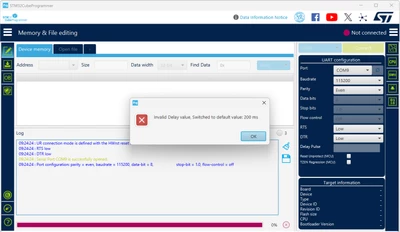
Error 'Invalid Delay value' when connect using UART protocol

  • May 30, 2025
  • 4 replies
  • 948 views

STM32CubeProgrammer v2.21.0

Phumphathai_1-1748572020298.png


Best answer by Phumphathai

Hello


I update to this version 2 day ago. Now I uninstall and reinstall with v2.19.0

I haven't found any new updates.

Maybe I update to Test on Production Version.


Thank you.

4 replies

KDJEM.1
Technical Moderator
May 30, 2025

Hello @Phumphathai and welcome to the community;


Could you please give more detail about the issue, which STM32 are you using? Are you using STM32 board?

Could you please check the STM32CubeProgrammer version? The latest STM32CubeProgrammer version is 2.19.0.

KDJEM1_0-1748602882135.png


Could you please try to update your toolchain and to use STM32CubeProgrammer 2.19.0 version 

Please let me know if the issue is solved or not?

Thank you.

Kaouthar

To give better visibility on the answered topics, please click on Accept as Solution on the reply which solved your issue or answered your question.
Associate II
May 30, 2025

Hello


I use STM32L476VG with custom board. But without any board connect to USB to UART this still happen.

Animation.gif

I use STM32CubeProgrammer v2.21.0 I think this is latest version

Phumphathai_0-1748618084017.png


As @Pavel A. show. Delay Pulse text box is read only and cannot fill any value

Thank you


Andrew Neil
Super User
May 30, 2025

@Phumphathai wrote:

Delay Pulse text box is read only and cannot fill any value


So, presumably, this must be coming from some configuration that you should supply?

And that value is missing or invalid.

The first message just tells you that it's using a default instead.


The rest of the video shows that there is no response from your target.


@Phumphathai wrote:

without any board connect to USB to UART this still happen.


Of course it would - with no board connected, there will certainly be no reply!


@Phumphathai wrote:

I use STM32L476VG with custom board.


So please give details - schematic?

Are you using the System Bootloader, or a custom bootloader?

How to write your question to maximize your chances to find a solution.

A complex system that works is invariably found to have evolved from a simple system that worked.A complex system designed from scratch never works and cannot be patched up to make it work.
Andrew Neil
Super User
May 30, 2025

Welcome to the forum.

As @KDJEM.1 said, you need to give some more details - Please see How to write your question to maximize your chances to find a solution for best results.

A complex system that works is invariably found to have evolved from a simple system that worked.A complex system designed from scratch never works and cannot be patched up to make it work.
Pavel A.
Super User
May 30, 2025

PavelA_0-1748606280165.png


PhumphathaiAuthorBest answer
Associate II
May 31, 2025

Hello


I update to this version 2 day ago. Now I uninstall and reinstall with v2.19.0

I haven't found any new updates.

Maybe I update to Test on Production Version.


Thank you.