
Associate
April 18, 2025
Solved

error upgrading STACK Version in Firmware Upgrade Service

  • April 18, 2025
  • 5 replies
  • 1243 views

Hello, 

    I am using NUCLEO-WB55RG board to implement BLE and I got error when I was Upgrading my STACK Version currently which is v0.0.0.0 in STM32CubeProgrammers FIRMWARE UPGRADE SERVICE option, I select stm32wb5x_BLE_Stack_full_fw.bin with 0x080D4000 memory location for stack upgrade which is preferred by STMicroelectronics official documentation, I have post my Screenshot after multiple attempts no update in STACK Version.

--> It is mandatory to upgrade STACK Version for implement BLE?

--> Also want better suggestion & Guidance Documents for BLE implement from basic to advance?

it would be grateful for any guidance!...
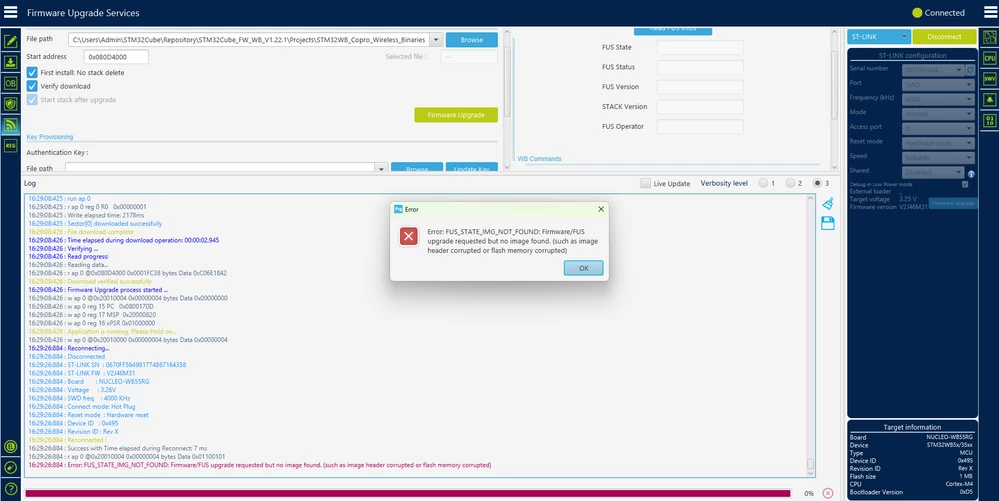
Screenshot 2025-04-18 162944.png

 Thank you.

Best answer by Aziz BRIGUI

Hello @Sudarshan0000

It seems you have activated Anti-Rollback which means that you will not be able to downgrade the stack. That message means that the stack you have installed is newer than the stack you want to install.

This is expected behavior if anti-rollback is activated.

Aziz

5 replies

Aziz BRIGUI
Technical Moderator
April 22, 2025

Hello @Sudarshan0000,

Could you please uncheck first install before trying to upgrade the stack and get back to us if this resolves the issue ?

Aziz

In order to give better visibility on the answered topics, please click on 'Accept as Solution' on the reply which solved your issue or answered your question.
Associate
April 23, 2025

Thanks @Aziz BRIGUI for suggestion but I have tried to upgrade STACK Version with this method (by uncheck first install: No stack delete) but still same error shows.

Aziz BRIGUI
Technical Moderator
April 25, 2025

Hello @Sudarshan0000,

Could read the FUS info and give me a screenshot of the details ?

Aziz

In order to give better visibility on the answered topics, please click on 'Accept as Solution' on the reply which solved your issue or answered your question.
Associate
May 3, 2025

Yes @Aziz BRIGUI

I have taken screenshot of my FUS info here is screenshot.Screenshot 2025-04-23 153217.png

Associate
May 5, 2025

Thanks @Aziz BRIGUI for suggestion,  According to document address got auto select when select stm32wb5x_BLE_Stack_full_fw.bin file for BLE firmware upgrade & address is @0x080CE000, but failed to upgrade, So as per your input try with @0x080D4000 address still error occurred, I have taken screenshot please refer below screenshot.Screenshot 2025-05-05 165801.png

Aziz BRIGUI
Technical Moderator
May 5, 2025

Hello @Sudarshan0000,

I have never recommended using 0x080D4000 with this stack (Please verify my comments). Documentation (and automatic calculation in STM32CubeProgrammer) is correct, start address should be @0x080CE000.

Could you please retry upgrading the stack with the automatically calculated address (@0x080CE000) and with "First install" unchecked and provide a screenshot ?

Thanks,

Aziz

In order to give better visibility on the answered topics, please click on 'Accept as Solution' on the reply which solved your issue or answered your question.
Associate
May 6, 2025

Hello @Aziz BRIGUI 

    As per my requirement, I selected stm32wb5x_BLE_Stack_full_fw.bin and as per document & auto select feature start address set to  @0x080CE000. as you can watch in screenshot, so can you give me idea about any another method, I have also added screenshot which has FUS information, with this FUS can I implement BLE on my NUCLEO-WB55RG board.

Screenshot 2025-05-06 095912.png


Screenshot 2025-05-06 101403.png

Thank you.

Aziz BRIGUI
Aziz BRIGUIBest answer
Technical Moderator
May 7, 2025

Hello @Sudarshan0000

It seems you have activated Anti-Rollback which means that you will not be able to downgrade the stack. That message means that the stack you have installed is newer than the stack you want to install.

This is expected behavior if anti-rollback is activated.

Aziz

In order to give better visibility on the answered topics, please click on 'Accept as Solution' on the reply which solved your issue or answered your question.
Associate
May 30, 2025

Hello @Aziz BRIGUI 

             Thank you @Aziz BRIGUI, Now I am Facing another issue, I am not able to Start Wireless Stack in FUS, So my question is How can I enable or start Wireless Stack which run Stack which I upload on Nucleo-WB55RG development board with STM32WB55RGV6 microcontroller, My another question is If wireless stack is running on my microcontroller how can I confirm that Wireless stack is running is there any flag or any command for it? I have attached screenshot for your reference.

After click on Start Wireless Stack, Error pop up windows appeared on my screen how can I solve this issue?

After click on Start Wireless Stack I got Above Error Popups.After click on Start Wireless Stack I got Above Error Popups.