

ADiet.1
Associate III
March 10, 2023
Solved

How can I use the STM32CubeProgrammer windows executable to read a memory area without the device resetting?

  • March 10, 2023
  • 8 replies
  • 5746 views

I have been trying to read a memory area as follows on windows power shell:

.\STM32_Programmer_CLI.exe -c port=SWD -r8 0x08080000 8 -r8 0x08080C00 8

but that triggers a reset of the device. I do not want a device reset, I just want to read the memory as specified. How to do that?
This topic has been closed for replies.
Best answer by waclawek.jan

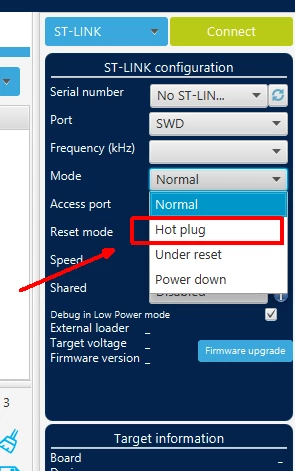
This

0693W00000aIfe2QAC.png 

should result in debugger connecting without reset. There should be a counterpart to this in the CLI too.

JW

8 replies

waclawek.jan
waclawek.janBest answer
Super User
March 10, 2023

This

0693W00000aIfe2QAC.png 

should result in debugger connecting without reset. There should be a counterpart to this in the CLI too.

JW

ADiet.1
ADiet.1Author
Associate III
March 10, 2023

I tried that, but when I use the mode HOTPLUG I get incorrect results! The application returns bytes that are incorrect!!

ADiet.1
ADiet.1Author
Associate III
March 10, 2023

I asked for 8 bytes at two different addresses and when using HOTPLUG I got the results swapped (checked with GUI application). now it seems to be working. I have the feeling I cannot rely on these tools. What can I do?

Pavel A.
Super User
March 10, 2023

If you can reproduce inconsistent or wrong reads, please post a bug report here.

waclawek.jan
Super User
March 10, 2023

> I asked for 8 bytes at two different addresses and when using HOTPLUG I got the results swapped (checked with GUI application).

Show.

Also, try to read out a known piece of ROM memory, e.g. the device ID or Unique ID, and compare to expected values, and/or readout under reset.

JW

ADiet.1
ADiet.1Author
Associate III
March 10, 2023

I also noticed something else: I just did this command:

 .\STM32_Programmer_CLI.exe -c port=SWD -w8 0x08080000 0xAA 0x00 0x00 0x00 0x00 0x00 -w8 0x08080C00 0x00 0x00 0x00 0x00 0x00 0x00 -v

to write some bytes, and this command did NOT trigger a reset. I thought with "mode=Normal" it is resetting?

I just connected with the GUI version and disconnected, and that did trigger a reset. Maybe the version (2.12.0) I am using on the CLI has bugs?

ADiet.1
ADiet.1Author
Associate III
March 10, 2023

Example of incorrect results: Is that flag AE now on 0x08080000 or on 0x08080C00? Which output is the correct one?

PS C:\Program Files\STMicroelectronics\STM32Cube\STM32CubeProgrammer\bin> .\STM32_Programmer_CLI.exe -c port=SWD mode=NORMAL -r8 0x08080000 8 -r8 0x08080C00 8
 -------------------------------------------------------------------
 STM32CubeProgrammer v2.12.0
 -------------------------------------------------------------------
 
ST-LINK SN : 53FF6E065056705437210781
ST-LINK FW : V2J29S7
Board : --
Voltage : 3.24V
SWD freq : 4000 KHz
Connect mode: Normal
Reset mode : Software reset
Device ID : 0x447
Revision ID : Rev Z
Device name : STM32L07x/L08x/L010
Flash size : 128 KBytes
Device type : MCU
Device CPU : Cortex-M0+
BL Version : 0xB2
 
0x08080000 : 00 00 00 00 AE 00 00 00
 
0x08080C00 : 00 00 00 00 00 00 00 00
 
PS C:\Program Files\STMicroelectronics\STM32Cube\STM32CubeProgrammer\bin> .\STM32_Programmer_CLI.exe -c port=SWD mode=HOTPLUG -r8 0x08080000 8 -r8 0x08080C00 8
 -------------------------------------------------------------------
 STM32CubeProgrammer v2.12.0
 -------------------------------------------------------------------
 
ST-LINK SN : 53FF6E065056705437210781
ST-LINK FW : V2J29S7
Board : --
Voltage : 3.24V
SWD freq : 4000 KHz
Connect mode: Hot Plug
Reset mode : Software reset
Device ID : 0x447
Revision ID : Rev Z
Device name : STM32L07x/L08x/L010
Flash size : 128 KBytes
Device type : MCU
Device CPU : Cortex-M0+
BL Version : 0xB2
 
0x08080000 : 00 00 00 00 00 00 00 00
 
0x08080C00 : 00 00 00 00 AE 00 00 00

PS C:\Program Files\STMicroelectronics\STM32Cube\STM32CubeProgrammer\bin> .\STM32_Programmer_CLI.exe -c port=SWD mode=NORMAL -r8 0x08080000 8 -r8 0x08080C00 8

   -------------------------------------------------------------------

            STM32CubeProgrammer v2.12.0

   -------------------------------------------------------------------

ST-LINK SN : 53FF6E065056705437210781

ST-LINK FW : V2J29S7

Board    : --

Voltage   : 3.24V

SWD freq  : 4000 KHz

Connect mode: Normal

Reset mode : Software reset

Device ID  : 0x447

Revision ID : Rev Z

Device name : STM32L07x/L08x/L010

Flash size : 128 KBytes

Device type : MCU

Device CPU : Cortex-M0+

BL Version : 0xB2

0x08080000 : 00 00 00 00 AE 00 00 00

0x08080C00 : 00 00 00 00 00 00 00 00

PS C:\Program Files\STMicroelectronics\STM32Cube\STM32CubeProgrammer\bin> .\STM32_Programmer_CLI.exe -c port=SWD mode=HOTPLUG -r8 0x08080000 8 -r8 0x08080C00 8

   -------------------------------------------------------------------

            STM32CubeProgrammer v2.12.0

   -------------------------------------------------------------------

ST-LINK SN : 53FF6E065056705437210781

ST-LINK FW : V2J29S7

Board    : --

Voltage   : 3.24V

SWD freq  : 4000 KHz

Connect mode: Hot Plug

Reset mode : Software reset

Device ID  : 0x447

Revision ID : Rev Z

Device name : STM32L07x/L08x/L010

Flash size : 128 KBytes

Device type : MCU

Device CPU : Cortex-M0+

BL Version : 0xB2

0x08080000 : 00 00 00 00 00 00 00 00

0x08080C00 : 00 00 00 00 AE 00 00 00

Aziz BRIGUI
Technical Moderator
March 15, 2023

Hello @ADiet.1​,

I can't reproduce the issue you're facing for now. However, could you please share the trace for the following CLI instructions ? Erasing the flash might change things depending on the application you're running. If this is the case, I will provide further details on what is happening.

>STM32_Programmer_CLI.exe -c port=SWD -e all
>STM32_Programmer_CLI.exe -c port=SWD mode=NORMAL -r8 0x08080000 8 -r8 0x08080C00 8
>STM32_Programmer_CLI.exe -c port=SWD mode=HOTPLUG -r8 0x08080000 8 -r8 0x08080C00 8

Your feedback will be very helpful.

Thanks,

Aziz

In order to give better visibility on the answered topics, please click on 'Accept as Solution' on the reply which solved your issue or answered your question.
ADiet.1
ADiet.1Author
Associate III
March 15, 2023

Here is the output:

PS C:\Program Files (x86)\STMicroelectronics\STM32Cube\STM32CubeProgrammer\bin> ./STM32_Programmer_CLI.exe -c port=SWD -e all
 -------------------------------------------------------------------
 STM32CubeProgrammer v2.13.0
 -------------------------------------------------------------------
 
ST-LINK SN : 53FF71065056705420540981
ST-LINK FW : V2J29S7
Board : --
SWD freq : 4000 KHz
Connect mode: Normal
Reset mode : Software reset
Device ID : 0x447
Revision ID : Rev Z
Device name : STM32L07x/L08x/L010
Flash size : 128 KBytes
Device type : MCU
Device CPU : Cortex-M0+
BL Version : 0xB2
 
 
Mass erase ...
 
Mass erase successfully achieved
PS C:\Program Files (x86)\STMicroelectronics\STM32Cube\STM32CubeProgrammer\bin> ./STM32_Programmer_CLI.exe -c port=SWD mode=NORMAL -r8 0x08080000 8 -r8 0x08080C00 8
 -------------------------------------------------------------------
 STM32CubeProgrammer v2.13.0
 -------------------------------------------------------------------
 
ST-LINK SN : 53FF71065056705420540981
ST-LINK FW : V2J29S7
Board : --
Voltage : 3.21V
SWD freq : 4000 KHz
Connect mode: Normal
Reset mode : Software reset
Device ID : 0x447
Revision ID : Rev Z
Device name : STM32L07x/L08x/L010
Flash size : 128 KBytes
Device type : MCU
Device CPU : Cortex-M0+
BL Version : 0xB2
 
0x08080000 : 00 00 00 00 00 00 00 00
 
0x08080C00 : 00 00 00 00 00 00 00 00
 
PS C:\Program Files (x86)\STMicroelectronics\STM32Cube\STM32CubeProgrammer\bin> ./STM32_Programmer_CLI.exe -c port=SWD mode=HOTPLUG -r8 0x08080000 8 -r8 0x08080C00 8
 -------------------------------------------------------------------
 STM32CubeProgrammer v2.13.0
 -------------------------------------------------------------------
 
ST-LINK SN : 53FF71065056705420540981
ST-LINK FW : V2J29S7
Board : --
Voltage : 3.20V
SWD freq : 4000 KHz
Connect mode: Hot Plug
Reset mode : Software reset
Device ID : 0x447
Revision ID : Rev Z
Device name : STM32L07x/L08x/L010
Flash size : 128 KBytes
Device type : MCU
Device CPU : Cortex-M0+
BL Version : 0xB2
 
0x08080000 : 00 00 00 00 00 00 00 00
 
0x08080C00 : 00 00 00 00 00 00 00 00

ADiet.1
ADiet.1Author
Associate III
March 10, 2023

Just opened a bug report. Something is definitively not correct with the STM32CubeProgrammer application!

waclawek.jan
Super User
March 15, 2023

My guess is that this is related to the dual-bank operation and its related flags (UFB maybe?).

With hot-plug, the running program may switch the mapping without knowledge of the programmer, and then it's always questionable, how far the programmer/debugger should force its settings to the application.

JW