

CDyer.1
Associate III
September 22, 2020
Solved

How to reprogram stm32F769 DISCO board with the original DEMO code that it shipped with?

  • September 22, 2020
  • 7 replies
  • 3168 views

Hi guys,

I'm playing around with the board in the question and I'm struggling with it even though I'm fairly familiar with the F767 Nucleo. What I want:

to reprogram the demo that came on to the board for now, as I haven't managed to get the display on the board working at all since before then. I've downloaded the stm32f769 disco demo that includes the appropriate .HEX

What I've done:

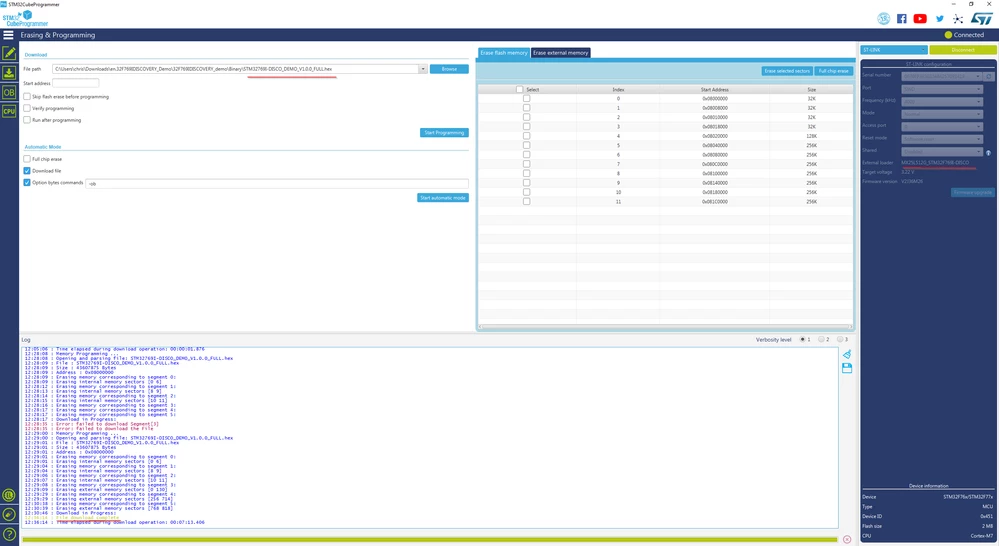
I've upgraded st-link using the upgrade utility. Within STM32 Cube programmer, I've selected the appropriate External Loader for my disco board. My board is connected via st-link and is recognised by cube programmer.

On the erasing and Programming tab I've selected the correct .HEX file and the device begins to program. The file is about 120MB and so takes a good while to program.
0693W000004GiAmQAK.png

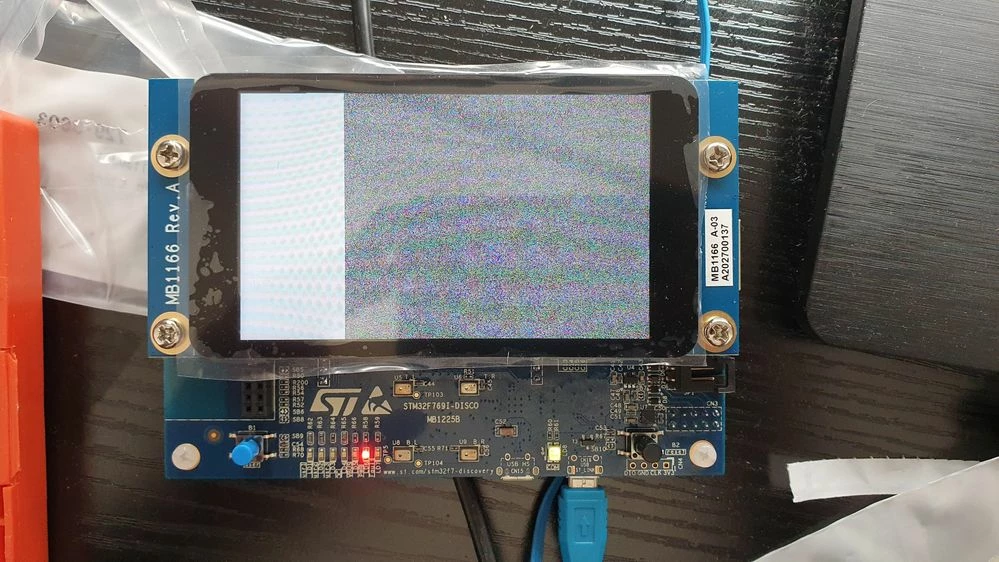
Once the programming has complete, cube programmer tells me that it was successful. However the screen is corrupted, as per the image.
0693W000004GiEKQA0.jpg

Any suggestions with this would be great, it's probably something that I'm doing wrong

This topic has been closed for replies.
Best answer by Mike_ST

Oh, sorry, try the following link:

7 replies

SSchm.2
Visitor II
September 23, 2020

I'm having the exact same question!! Thanks for 'not being alone' with that.

However, I have yet another question: the hex-file from the demo is 'STM32769I-DISCO_DEMO_V1.0.0_FULL.hex'. It has version# 1.0.0 in it's name and the file is from 2018. The demo board shows under 'System Info' -> 'Firm Ver. V1.2.0'. Anyone knows where to find this latest version?

CDyer.1
CDyer.1Author
Associate III
September 23, 2020

Hi, did you manage to get the demo firmware reprogrammed on to the board or have you had no success at all? There are other demos available in the cubeF7 package if you haven't looked at that yet:

https://www.st.com/en/embedded-software/stm32cubef7.html

I've had no success programming any of the demos though unfortunately

SSchm.2
Visitor II
September 23, 2020

To be honest, I haven't even tried it yet J I’m planning on returning the board – and I would like to return it in its original state. The original state is demo V.1.2.0 … unless I can’t find this version I’m not even going to start experimenting with the board. Adding your experience to it – I might just return it right away.

I have a lot of experience with embedded – but ST is totally new to me. I have to admit, it is a bit hard to find a way into that world. I’m a professional C/C++ developer (>20y) and I would like to dig into developing right away, there are so many cool projects in my head – especially in combination with this awesome LCD on board (including capacitive touch!). But going through all the information’s and options seams to render the task of developing something very far away …

Mike_ST
Technical Moderator
September 23, 2020

1.0.0 and 1.2.0 are here:

https://community.st.com/s/contentdocument/0690X00000ARRXhQAP

Please don't ask why they have different size, I don't know.

SSchm.2
Visitor II
September 23, 2020

Oh, something I noticed: my ST-LINK FW-Version is newer than yours: mine is V2J37M26.

Tesla DeLorean
Guru
September 23, 2020

Don't think that makes a significant difference, and they are easy to upgrade.

The boards have imagery stored in QSPI, as I recall, so the External Loader needs to selected and functional.

Tips, Buy me a coffee, or three.. PayPal VenmoUp vote any posts that you find helpful, it shows what's working..
CDyer.1
CDyer.1Author
Associate III
September 23, 2020

Hi Clive, I've selected the correct external loader in the cube programmer. I've highlighted in the image where it states which external loader ​is selected. Any further ideas that I can attempt? Seems like a strange error that I'm getting.

SSchm.2
Visitor II
September 24, 2020

@Mike_ST​

>> Please don't ask why they have different size, I don't know.

... and different names :)

Which leads to the question: what is the difference between them and which one is the one to flash onto STM32769I-DISCO?

SSchm.2
Visitor II
September 24, 2020

Oh well ... this is disappointing.

I managed to flash 'STM32CubeDemo_STM32769I-DISCO_V1.4.0.hex' according to (zip) [32F769IDISCOVERY_demo]/readme.txt.

However, it ain't not the same SW that the board came with. Before the reflashing there where a 'Embedded Wizard' demo as well as a 'Touch GFX' application on it. After flashing these went away and got replaced by 'Garden Control' and 'Games'.

Mike_ST
Technical Moderator
September 24, 2020

---

CDyer.1
CDyer.1Author
Associate III
September 24, 2020

Hi Mike, I'm getting the error "this page has moved or doesn't exist". Bad link?​

Mike_ST
Mike_STBest answer
Technical Moderator
September 24, 2020

Oh, sorry, try the following link:

CDyer.1
CDyer.1Author
Associate III
September 24, 2020

In case anyone has similar issues as the one in the top post. If you follow the same exact procedures but use THIS binary instead, everything works. Any other Binary files posted on STs site are either broken or require the media to be added externally via the USB.