Associate II
March 1, 2025
Solved

How to solve Error: ST-LINK error (DEV_TARGET_NOT_HALTED)

  • March 1, 2025
  • 2 replies
  • 925 views

Hello, 

I am unable to connect to STM32L562-DK via STM32CubeProgrammer , and when I do I get this error message

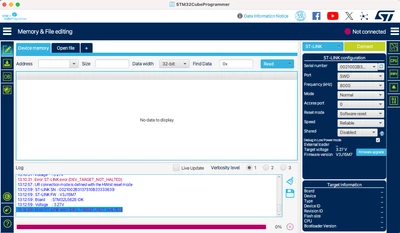
13:12:59 : Error: ST-LINK error (DEV_TARGET_NOT_HALTED)

Could someone please help me rectify this issue, Thanks


Screenshot 2025-03-01 at 1.19.59 PM.png

Best answer by chsriniv

I was able to recover my device by following these steps.

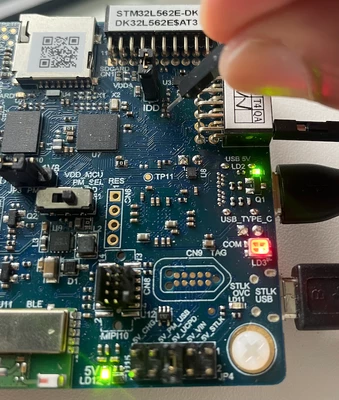
1. You need to ensure that your VDD doesn’t get interrupted. For this place the JP4 from 5V_STLK to 5V_UCPD (5V_UCPD provided by a host PC connected to CN15 through a USB Type-C® cable)

2. Connect the normal CN17 through a USB Type-B® cable (as usual)

3. Take a male to male connector and provide 3V3 power source from your PMOD Pin 6 to a common point between R32 and R33

4. connect via STM32CubeProgrammer and ensure you remove TZEN=0 inOption bytes and put the

RDP level 0 and then apply, mass erase and then your MCU is ready to use now.
Screenshot 2025-03-08 at 1.21.23 PM.png

Note that you need to do this simultaneously, unplug and plug in JP4 to 5V_UCPD and in other hand keep  the 3V3 on the common point between R32 and R33. This will ensure you are in RSS/Bootloader mode and connect via STM32CubeProgrammer

2 replies

chsrinivAuthor
Associate II
March 2, 2025

I also tried to connect Boot0 pin to VDD (3V3 from Pmod pin 6) exactly as shown in the image. But, still no luck

chsriniv_0-1740883144933.png


chsrinivAuthorBest answer
Associate II
March 8, 2025

I was able to recover my device by following these steps.

1. You need to ensure that your VDD doesn’t get interrupted. For this place the JP4 from 5V_STLK to 5V_UCPD (5V_UCPD provided by a host PC connected to CN15 through a USB Type-C® cable)

2. Connect the normal CN17 through a USB Type-B® cable (as usual)

3. Take a male to male connector and provide 3V3 power source from your PMOD Pin 6 to a common point between R32 and R33

4. connect via STM32CubeProgrammer and ensure you remove TZEN=0 inOption bytes and put the

RDP level 0 and then apply, mass erase and then your MCU is ready to use now.

Screenshot 2025-03-08 at 1.21.23 PM.png

Note that you need to do this simultaneously, unplug and plug in JP4 to 5V_UCPD and in other hand keep  the 3V3 on the common point between R32 and R33. This will ensure you are in RSS/Bootloader mode and connect via STM32CubeProgrammer