Associate II
March 20, 2026
Solved

How to use STM32CubeProgrammer to set the OEM key and RDP0 to RDP2?

  • March 20, 2026
  • 2 replies
  • 258 views

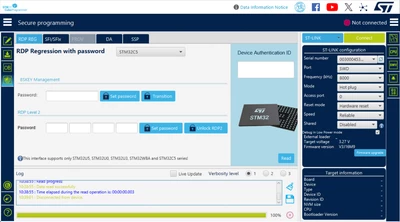
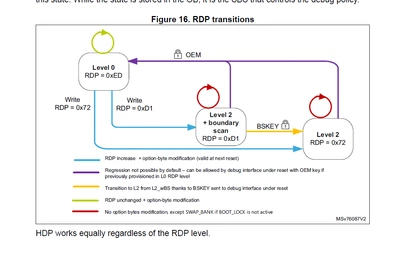
STM32C5 unlock RDP2 need OEM key, How to use STM32CubeProgrammer to set the OEM key and RDP0 to RDP2?

Please provide me with a correct operation procedure. Thank you.
PixPin_2026-03-20_10-42-29.png

PixPin_2026-03-20_10-43-37.png


Best answer by Aziz BRIGUI

Hi @ShimiaoWang,

You can set the RDP level 2 password by writing four 32-bit words into the password field and click on "Set password". If you want to set a password for RDP level 2 with boundary scan, you can write a 32-bit BSKEY.


Please carefully refer to How to set the RDP password keys and levels on STM32C5 MCUs - stm32mcu and STM32CubeProgrammer software description - User manual before any manipulation.

PS: @MGogr.1, STM32CubeProgrammer v2.22.0 supports STM32C5 and the message has been changed as per the screenshot from @ShimiaoWang.

Aziz

2 replies

MGogr.1
Senior
March 20, 2026

Cube Programmer supports for the following:

"Lock RDP command is only available with STM32U5/STM32WBA/STM32U0/STM32U3".

Since your Controller is C5 series it wont possible.

Aziz BRIGUI
Aziz BRIGUIBest answer
Technical Moderator
March 23, 2026

Hi @ShimiaoWang,

You can set the RDP level 2 password by writing four 32-bit words into the password field and click on "Set password". If you want to set a password for RDP level 2 with boundary scan, you can write a 32-bit BSKEY.


Please carefully refer to How to set the RDP password keys and levels on STM32C5 MCUs - stm32mcu and STM32CubeProgrammer software description - User manual before any manipulation.

PS: @MGogr.1, STM32CubeProgrammer v2.22.0 supports STM32C5 and the message has been changed as per the screenshot from @ShimiaoWang.

Aziz

In order to give better visibility on the answered topics, please click on 'Accept as Solution' on the reply which solved your issue or answered your question.
MGogr.1
Senior
March 24, 2026

OK. Thanks.

I'll need to update my Programmer.