
Visitor II
March 24, 2025
Solved

Issue with BOR Configuration on STM32G031F4P6 in STM32CubeProgrammer

  • March 24, 2025
  • 2 replies
  • 452 views

Hi,

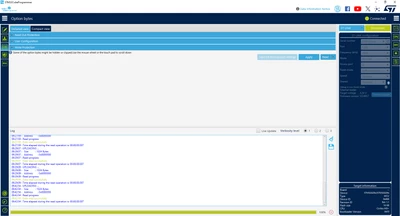
I am currently working with a custom PCB(Print Circuit Board) that features the STM32G031F4P6 microcontroller, and I am unable to locate the option to configure the Brown-Out Reset (BOR) in the Option Bytes within STM32CubeProgrammer for this device. Interestingly, I am able to see and configure the BOR on the Nucleo-G031K8 development board.
OUAHMANI_0-1742810509149.png


Could you please clarify if there is a specific reason for this discrepancy? Is there a way to enable or configure the BOR on the STM32G031F4P6 on my custom PCB? Additionally, are there any alternative methods to monitor the power supply or track the voltage levels of the STM32G031F4P6 microcontroller?

Thanks,

Best answer by KDJEM.1

Hello @OUAHMANI and welcome to the community;


Similar issue is reported here.

I reported this issue internally and I will come back to you with more details as soon as possible.

Internal ticket number: 205995 (This is an internal tracking number and is not accessible or usable by customers).

Thank you.

Kaouthar

2 replies

KDJEM.1
KDJEM.1Best answer
Technical Moderator
March 24, 2025

Hello @OUAHMANI and welcome to the community;


Similar issue is reported here.

I reported this issue internally and I will come back to you with more details as soon as possible.

Internal ticket number: 205995 (This is an internal tracking number and is not accessible or usable by customers).

Thank you.

Kaouthar

To give better visibility on the answered topics, please click on Accept as Solution on the reply which solved your issue or answered your question.
KDJEM.1
Technical Moderator
July 8, 2025

Hello @OUAHMANI ;


The issue is fixed in STM32CubeProgrammer 2.20.0 version.

I recommend you to try with the latest version and let me know if the issue is solved or not.


Thank you.

Kaouthar

To give better visibility on the answered topics, please click on Accept as Solution on the reply which solved your issue or answered your question.