MWetter
Associate III
January 10, 2024
Question

Problems with debugging and downloading program STM32CubeIDE/CubeProgrammer

  • January 10, 2024
  • 5 replies
  • 2704 views

Hello everyone,


I encountered a problem while debugging my program.

CubeIDE Version 1.14 , CubeProgrammer Version 2.9.0, ST-Link Version V2J43S7


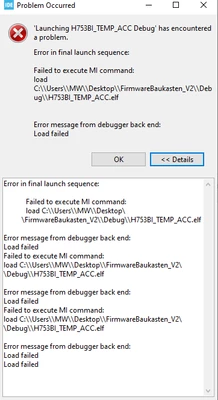
The ST-Link/V2 is found. You can erase the Chip (STM32H753BIT6) but can't download the .elf file (CubeProgrammer).

In the CubeIDE you can't debug but the ST-Link and the STM32-Controller is found.

We tried following steps:

  • switching the ST-Link on/off
  • switching our custom hardware with the STM32H7 on it on/off
  • reinstalled the Workbench
  • tried downloading another program on my PC --> failed
  • tried downloading another program with another PC --> success
  • another ST-Link at my workplace --> failed
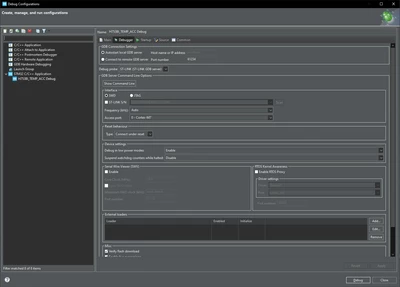
  • compared the debugging configurations --> both the same
  • another custom hardware with my PC --> failed

The error:
MWetter_1-1704882369077.png

The debug configurations:

MWetter_2-1704882555251.png


If you have any idea...


    This topic has been closed for replies.

    5 replies

    Semer CHERNI
    ST Employee
    January 11, 2024

    Hello @MWetter 

    First let me thank you for posting.

    Could you try downloading the elf file with STM32CubeProgrammer as standalone application.

    Also could you try to change the GDB server port number (increase it by 4 at least)

    KR,
    Semer.

    MWetter
    MWetterAuthor
    Associate III
    January 16, 2024

    Hi @Semer CHERNI 


    I tried downloading the elf file with the STM32CubeProgrammer.

    It did not work.

    Also changing the server port did not work.


    Have you any idea why?


    Thank you very much

    Semer CHERNI
    ST Employee
    January 16, 2024

    Hello @MWetter 

    Since the issue is still existing using CubeProgrammer, I believe it's either the programmer tool is failing or some HW issue with the board.

    I will redirect you to the STM32CubeProgrammer forum and send the question to the responsible team.

    KR,
    Semer.

    Aziz BRIGUI
    Technical Moderator
    January 17, 2024

    Hello @MWetter ,


    I find it weird that you have CubeIDE Version 1.14 with CubeProgrammer Version 2.9.0. Normally you would have CubeProgrammer 2.15.

    In any case could you please try downloading an ELF file with STM32CubeProgrammer v2.15 (standalone) on your pc and send us the verbosity 3 log.

    Since you've managed to download binaries on your custom hardware using another pc, I highly doubt it's a hardware issue. 


    Thanks,

    Aziz

    In order to give better visibility on the answered topics, please click on 'Accept as Solution' on the reply which solved your issue or answered your question.
    MWetter
    MWetterAuthor
    Associate III
    January 18, 2024

    Hi @Aziz BRIGUI 


    I tried it with the CubeProgrammer V2.15.


    I attached the logfile.


    Thank you


    Aziz BRIGUI
    Technical Moderator
    January 18, 2024

    Hello @MWetter,


    From the logs you sent, your .ELF file contains an external memory segment. The initialization of the external loader fails (and by consequence the external flash erase will fail). Are you using an external memory on your custom Hardware ? If not, the fail is expected, if yes, could you specify it's reference and attach your external loader ? 


    Thanks,

    Aziz

    In order to give better visibility on the answered topics, please click on 'Accept as Solution' on the reply which solved your issue or answered your question.
    Tesla DeLorean
    Guru
    January 18, 2024

    Supposedly ST's own MX25LM51245G_STM32H7B3I-DISCO-SFIx.stldr

    Most assuredly NOT going to work with an H753, which I'm pretty sure doesn't support OCTOSPI, and has a completely different die and pin muxing.

    Tips, Buy me a coffee, or three.. PayPal VenmoUp vote any posts that you find helpful, it shows what's working..