
Associate
October 13, 2025
Solved

STLink cannot communicate with STM32L5 : DEV_TARGET_NOT_HALTED

  • October 13, 2025
  • 1 reply
  • 342 views

Hello,

I am using the discovery kit with STM32L562QE MCU (UM2617). I tried to disable the TrutZone following the instructions in this article : https://community.st.com/t5/stm32-mcus/how-to-disable-trustzone-on-stm32u5-series/ta-p/49793

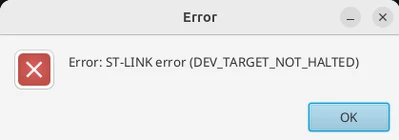
However, after doing Step 3 (in the article), I can no longer interact with my card. When I try to connect to it using STM32CubeProgrammer or by flashing, I always have the same error : ST-LINK error : DEV_TARGET_NOT_HALTED
MaxenceV_0-1760362265428.png

I found some persons with the same problems :

https://community.st.com/t5/stm32-mcus-boards-and-hardware/st-link-error-dev-target-not-halted/td-p/278454

https://community.st.com/t5/stm32-mcus-boards-and-hardware/error-in-initializing-st-link-device-reason-9-target-not-halted/td-p/85174

But the solutions described do not seem to work for me. Here is what I've tried :

- Power off / Power on

- Update STLink

- Set NRST to high (because there are many NRST on the board, maybe I did not set the right ones)

- Switching to boot mode (same thing than above)


Has anyone an idea on how to solve this problem ?

Thanks in advance for your help,

Maxence V

Best answer by Aziz BRIGUI

Hello @MaxenceV,

Yes, that's exactly it for the STM32L5-DK. Just make sure to power off/on the board after linking the two points with the wire as shown in this graph above (the power off/on is to make sure the new boot configuration is applied).

If that's done and you still can't connect via Hotplug mode, I'm afraid the chip is no longer recoverable (Root cause is that you most likely changed non-secure boot address Option Bytes or the nSWBOOT0 option bit).

I suggest for anyone trying to work with Trust Zone to first check this resource before any manipulation:

Introduction to Arm® TrustZone® features on STM32L5, STM32U5, and STM32U3 MCUs - Application note

Aziz


1 reply

Aziz BRIGUI
Technical Moderator
October 13, 2025

Hello @MaxenceV,

Try connecting in hotplug mode with Boot0 pin at VDD.

Aziz

In order to give better visibility on the answered topics, please click on 'Accept as Solution' on the reply which solved your issue or answered your question.
MaxenceVAuthor
Associate
October 13, 2025

Hello,

Just to be sure that we are talking about the same thing. Here is the only reference I found about boot0 in the doc.

MaxenceV_0-1760363119250.png

After setting, boot0 at 3V3 (I did the same setup as the doc), and trying to connect in Hot plug mode the error has changed. Now I have this :

MaxenceV_1-1760363233715.png


Aziz BRIGUI
Aziz BRIGUIBest answer
Technical Moderator
October 14, 2025

Hello @MaxenceV,

Yes, that's exactly it for the STM32L5-DK. Just make sure to power off/on the board after linking the two points with the wire as shown in this graph above (the power off/on is to make sure the new boot configuration is applied).

If that's done and you still can't connect via Hotplug mode, I'm afraid the chip is no longer recoverable (Root cause is that you most likely changed non-secure boot address Option Bytes or the nSWBOOT0 option bit).

I suggest for anyone trying to work with Trust Zone to first check this resource before any manipulation:

Introduction to Arm® TrustZone® features on STM32L5, STM32U5, and STM32U3 MCUs - Application note

Aziz


In order to give better visibility on the answered topics, please click on 'Accept as Solution' on the reply which solved your issue or answered your question.