
Associate
August 9, 2023
Question

STLink V2 Not recognizing STM32CubeProgrammer? UR connection mode is defined with the HWrst reset mo
  • August 9, 2023
  • 8 replies
  • 27224 views

zacharycain_0-1691599853462.png

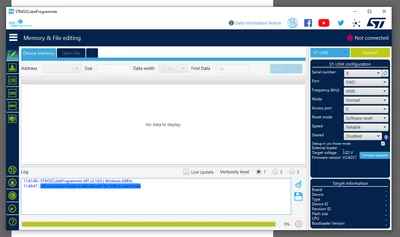
ST Link not recognizing STM Cube Programmer? - From screenshot you can see pulls up single character serial number and has no target information. I can (and did) upgrade firmware to latest on ST Link. Downloaded all drivers etc. Still won't connect. Keep getting "UR connection mode is defined with the HWrst reset mode" log entry.


8 replies

Associate
August 9, 2023

Tried changing "Shared" to enabled. The single character serial number disappears and is replaced with "No ST-LINK Detected." Tried changing "Reset Mode" to "hardware Reset"- nothing

Visitor II
March 6, 2025

Thankyou zachary.cain, I have followed your suggestion and it works.

Tesla DeLorean
Guru
August 9, 2023

Serial Number suggests you have a fake / counterfeit device, ST is not supporting them.

Tips, Buy me a coffee, or three.. PayPal VenmoUp vote any posts that you find helpful, it shows what's working..
Associate
August 9, 2023

I'm using this at work. Use on multiple other machines with same software and works fine. Not counterfeit - sourced from DigiKey electronics

Tesla DeLorean
Guru
August 9, 2023

Or a third party on their store, would suggest you pull your invoice and start an RMA.

Single character serial numbers are highly suggestive of counterfeit ST-LINK's. You have a picture of the back label on the device?

Tips, Buy me a coffee, or three.. PayPal VenmoUp vote any posts that you find helpful, it shows what's working..
Billy OWEN
ST Employee
August 11, 2023

Hi @zachary.cain 


The forum moderator had marked your post as needing a little more investigation and direct support. An online support case has been created on your behalf, please stand by for just a moment and you will hear from us.


Regards,

Billy

Visitor II
November 13, 2023

Hi

I am having the same problem,

I have around 40 different STM32 chips for my projects, but I am disappointed that programing it using stm32Cuteprogrammer is not working.

Even though the st-link works well with your previous version of programmer ( STM32 ST-LINK UTILITY Application)

But STM32 ST-LINK UTILITY does not have code protection feature and other features which made me prefer stm32Cuteprogrammer,

please kindly resolve

Pavel A.
Super User
November 13, 2023

@Nedu Same problem = single character serial number?  Counterfeit ST-LINK?


SBenn.2
Associate
December 2, 2023

I have the same problem, my fake STLink V2 has only the ! character as a serial number. I think STM32CubeProgrammer will not work with a device without a reasonable serial number BUT the STLink Utility does; you can download it here: https://www.st.com/en/development-tools/stsw-link004.html it's not as capable as STM32CubeProgrammer but is OK for uploading/downlaoding firmware.  Also as others have pointed out if the SHARED option is enabled in STM32CubeProgrammer and the REFRESH button clicked a serial number then appears and the fake device will then work with STM32CubeProgrammer, but only after upgrading the fake device firmware using STLink Utility - note any message about the device not being in DFU (Device Firmware Upgrade) mode just unplug from the USB socket and replug.


Associate
November 12, 2024

After installing the utility, it is showing this error

  • The code execution cannot proceed because mfc140.dil was not found.
SBenn.2
Associate
December 3, 2023

Further to my last post I can confirm that fake ST-Link V2 devices can also be detected and work with CubeIDE if the Shared ST-Link box, hidden away at the bottom of the Debug Configuration, is ticked.  My fake device has a Geehy MCU, not CKS or STM, but it does accept genuine STM firmware upgrades although it still displays the single ! character serial number - so maybe it's a hardware design issue - I don't know?

CubeIDE.jpg

Pavel A.
Super User
December 3, 2023

@SBenn.2 The serial number on your screenshot is not 1-character. ???

SBenn.2
Associate
December 4, 2023

Yes that's right, I only included the screen shot after the SHARED option is ticked, without being ticked the fake ST-Link is not detected in any way in CubeIDE i.e. not even showing the ! character, this is where it is different from CubeProgrammer, which does show an ! as the serial number, if not shared.

APuht
Associate
May 28, 2024

I had the same problem. Instead of the serial number, "C" was displayed. In the cube programmer I set the "Shared" option to Enable and everything worked.