
Associate II
September 9, 2025
Solved

STLink V2 SWD operation without connecting VDD_TARGET PIN

  • September 9, 2025
  • 13 replies
  • 1558 views

Dear ST Community.

I am designing devices with STM32WL microcontrollers with highly limited board space. I routed out traces for all SWD signals (VDD, GND, NRST, SWDIO, SWCLK)

I have my Prototype Board, original ST-Link V2 with V2J45S7 Firmware and STM32CubeProgrammer version v2.20.0. During testing I realized that the connection to Prototype is stable only when I connect all 5 signals. For some reason I thought that "VDD_Target" pin on ST-Link side can be left floating.

I have found a previous post:
https://community.st.com/t5/stm32-mcus-boards-and-hardware/how-to-connect-the-stlink-v2-to-my-board/m-p/94389
but unfortunately in my case I have to have "VDD_Target" signal connected on both ends. When disconnected STMCubeProgrammer responds with error shown below:
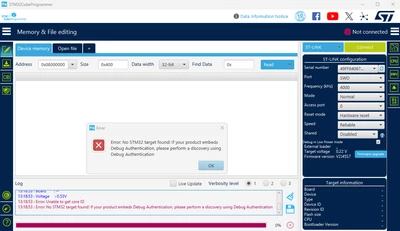
MJaworski_0-1757416779861.png

Do I need to have all SWD signals being connected in order to program my Prototype or is there any hidden option in ST-Link/STMCubeProgrammer that I can turn on, so in final design I can omit routing VDD pin for SWD connector?

Kind regards
Marek Jaworski.
Best answer by MJaworski

Okay people, let's wrap the thread up.

Thank you very much mfgkw and other users for help with this one, now jumping to conclusion:

1. STLink-V2 requires "VDD_TARGET" Pin connected in order to establish a connection with the Prototype BUT, it doesn't have to be connected to the Prototype itself, any other source of valid voltage on this pin allows to establish a connection between ST-Link and Prototype

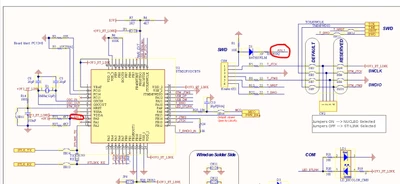
2. When using ST-Link from Nucleo Boards, there is no need for connecting "VDD_TARGET" to Prototype. From what I saw an Nucleo schematics (Document MB1136, p. 4):

MJaworski_0-1758017623801.png

there is a pullup resistor on the VDD_TARGET pin, so without connecting it to the Prototype, pullup provides a valid voltage to PA0(AIN_1) Pin

3. There is unverified claim that this pin doesn't have to be connected when using Keil software.

If there is nothing more to add, we can close this thread and let it get indexed by google for future generations.

13 replies

Associate II
September 9, 2025

In theory VDD is required to inform the ST-Link about your CPU voltage.

If you are really out of space for connections it would be possible to fake your CPU voltage for ST-Link without a connection. So if you drive your STM with 3.3V it will work when you present 3.3V on ST-Link between VDD and GND without really connecting it from your STM to ST-Link.

Then you need to connect GND, SWCLK and SWDIO in minimum (provided you set VDD to your CPU voltage at ST-Link side), and optionally NRST for Debugging and optionally SWO for tracing if needed.

MJaworskiAuthor
Associate II
September 9, 2025

Dear mfgkw,
thank you for your reply. I did not specify in post above, my Prototype, or should I write my STM32WL is powered from 3,3V stable source. Creating artificial voltage for STLink was my first idea but I thought that there might be some legitimate way developed by tool's manufacturer. If there is no such thing, I will commit a voltage fraud.

Kid regards
Marek Jaworski.

TDK
Super User
September 9, 2025

It should work. The ST-LINK/V2 operates at 3.3 V regardless of VDD_TARGET level according to the user manual. Are you sure you have this exact debugger? Some debuggers use a level shifter. Perhaps link to the debugger you have.

"If you feel a post has answered your question, please click ""Accept as Solution""."
MJaworskiAuthor
Associate II
September 10, 2025

Dear TDK,

Well, apparently it doesn't work for me. I bought ST-Link V2 from TME Retailer:

https://www.tme.eu/pl/details/st-link_v2/programatory/stmicroelectronics/

Here I provide pictures of both sides of my model:

MJaworski_0-1757509491784.jpeg

MJaworski_1-1757509499463.jpeg

And CubeProgrammer shows such properties of ST-LINK (Prototype not connected)

MJaworski_2-1757509576847.jpeg


The Prototype's schematic for SWD connection is depicted below

Prototype_Schematic.jpg

Still, when connecting Prototype to ST-Link and clicking "Connect" button in STMCubeProgrammer while having "VDD_Target" pin disconnected, it shows the same error from my original post. Do you have any other ideas? Any at this point would be helpful.

TDK
Super User
September 10, 2025

If you're out of ideas, connecting the VDD_Target pin to 3.3 V so the voltage is displayed in STM32CubeProgrammer correctly and trying to connect seems smart. There are pins on the programmer than supply 3.3 V. Maybe it does have level shifters on one side, or maybe it requires a certain voltage before it even tries.


"If you feel a post has answered your question, please click ""Accept as Solution""."
Associate II
September 10, 2025

Hi Marek,

what do you mean with "CON1"? Is it a cable to the external ST-Link shown in the picture?

(The pin designation looks like the embedded ST-Link/v2 from NUCLEO boards. The external ST-Link has a completely different assignemnt on its 20 pin connector for STM32.)


MJaworskiAuthor
Associate II
September 10, 2025

To both replies above:
TDK: sounds like a last resort, I'm gonna do that when I am really out of options.

mfgkw: that is correct, CON1 is a soldered male goldpin row to which I attached F2F goldpin ribbon which is connected to corresponding pins on 20-pin ST-LinkV2 header. We originally used Nucleo ST-Link but it turned out to be little unresponsive so I exchanged it for proper ST-Link. The electrical connection is solid, I assure you.


TDK
Super User
September 10, 2025

> We originally used Nucleo ST-Link but it turned out to be little unresponsive

There's no reason why the nucleo wouldn't work correctly. Something in the setup is causing the unreliability and it isn't the nucleo.

"If you feel a post has answered your question, please click ""Accept as Solution""."
MJaworskiAuthor
Associate II
September 11, 2025

Thank you for your insight, yet it doesn't answer the original topic. Is there anyone who can check and confirm similar behaviour of STM32WL+ST-LinkV2? If not, we can close this topic as unresolved.

Associate II
September 11, 2025

I have no STM32WL handy. But regarding ST-Link a STM32L should behave similiar, which I can use on a breakout board. With one of these I could try to reproduce it.

Which WL do you have? M0+ or M4?

MJaworskiAuthor
Associate II
September 11, 2025

I have STM32WLE5CCU6 so M4 version. Thank you in advance for your check.

Associate II
September 12, 2025

So I tried this night with an STM32F303 (M4F) successfully with ST-Link's VDD from an external source. It worked as expected.

Setup:
- Power supply A (3v3)
- Power supply B (3v3) (MUST BE THE SAME VOLTAGE AS POWER SUPPLY A!!!)
- STM32F303CBT6 on a breakout board
- standalone ST-LINK/V2, updated to "V2J46S7 STM8/STM32 Debugger"

Connections:
- all VDD for STM32F303CBT6 (1, 9, 24, 36, 48) from power supply A
- all GND for STM32F303CBT6 (8, 23, 35, 47) from power supply A
- connections between STM32F303CBT6 and ST-LINK/V2: RST (7), SWCLK (37), SWDIO (34)
- ST-LINK/V2.VDD from power supply B
- GND from power supply A to GND from power supply B

Attached you find a pic with power supply A with 3v3 and GND for the breakout board and another pic with ST-Link connected to the MCU, except VDD from another power supply B (right hand).

Note the GND connection between A and B...

Connection from CubeIDE to STM32 works fine for flashing, debugging etc..

(I expect this to work for all STM32 with ST-Link/v2, since VDD is only used for sensing the MCU's voltage.)


Since it does not work in your case: did you connect the GND of the two power supplies (internal from your board against the GND belonging to your external VDD supply)?

(This can be done with the GND of ST-Link to GND of external power of course)