

ma.alam9
Associate II
July 9, 2021
Solved

STM32 Cube programmer firmware read problem

  • July 9, 2021
  • 3 replies
  • 3388 views

Hi All,

Until now with F3 and F0 devices we were able to upload and download firmware files to and from MCUs using "BootloaderDemo" application from STM. That software had both upload and download capabilites. With the newer G474 device however, we had to move to CubeProgrammer because neither ST-Link software nor Bootloader_Demo seem to recognize it. It is overall a good solution that combines the STLINK and Bootloader software and the GUI is also much better. Firmware upload (from MCU to PC) feature seems to be missing though.

Any idea how or why is this so? or is there something i am missing?
This topic has been closed for replies.
Best answer by mƎALLEm

Dear @Community member​ ,

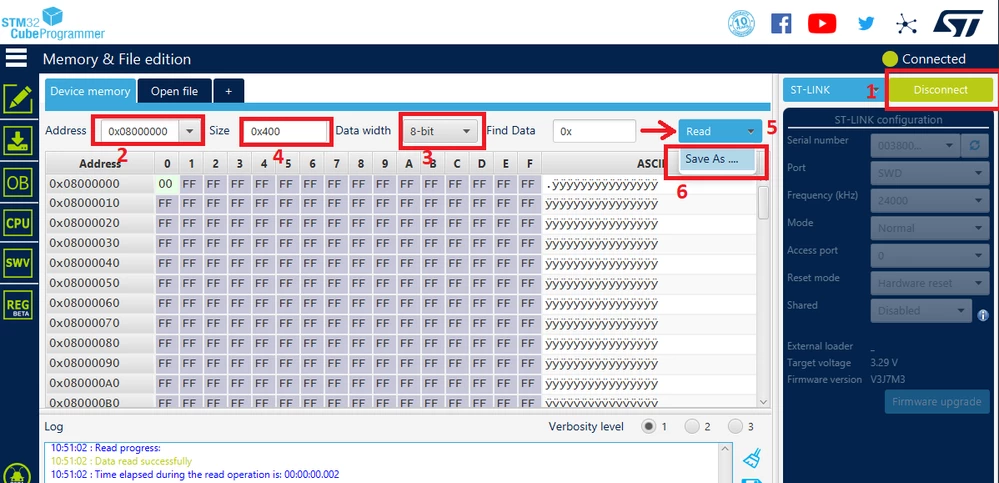
Procedure to read from MCU memory with STM32CubeProgrammer:

1- Connect your board

2- Select your memory start address.

3- Select 8 bit mode reading

4- The image size in bytes.

5 click "Read" button

6 Save as your file as .hex, .bin etc ..

0693W00000BdFijQAF.png 

If you find this answers to you question please click on "Select as Best".

STM32

3 replies

SBEN .2
Visitor II
July 9, 2021

Hello @Community member​ ,

It is possible to read the flash content using STM32CubeProgrammer (provided you have no flash protection/RDP level 0).

0693W00000BdFb4QAF.pngYou can check STM32CubeProgrammer software description - User manual , section 2.2.1, for how to do it.

Best regards,

@SBEN .2​ 

mƎALLEm
mƎALLEmBest answer
Technical Moderator
July 9, 2021

Dear @Community member​ ,

Procedure to read from MCU memory with STM32CubeProgrammer:

1- Connect your board

2- Select your memory start address.

3- Select 8 bit mode reading

4- The image size in bytes.

5 click "Read" button

6 Save as your file as .hex, .bin etc ..

0693W00000BdFijQAF.png 

If you find this answers to you question please click on "Select as Best".

STM32

"To give better visibility on the answered topics, please click on ""Accept as Solution"" on the reply which solved your issue or answered your question."
ma.alam9
ma.alam9Author
Associate II
July 9, 2021

THanks! @Community member​ .... it worked!

Tesla DeLorean
Guru
July 9, 2021

STM32 Cube Programmer provides a UART, CAN and USB mode, these are selected under the blue ST-LINK button

UART uses a COM port like the old Flash Loader Demonstrator

USB supports DFU modes/download like old DfuSe Demo / DFU Manager

CAN supports the System Boot Loader CAN connectivity via an ST-LINK/V3SET pod

Tips, Buy me a coffee, or three.. PayPal VenmoUp vote any posts that you find helpful, it shows what's working..