

AMart.33
Associate
June 1, 2023
Solved

STM32 Cube Programmer, I can not open files

  • June 1, 2023
  • 5 replies
  • 2044 views

I used to work with Nucleo board STM32G474 and programm them. Recently I can not open the file to programm my devices. I looks a window problem.
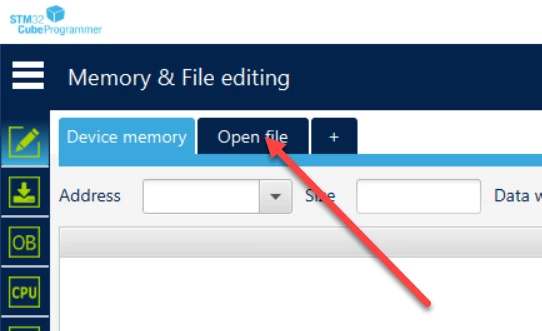

_legacyfs_online_stmicro_images_0693W00000blINeQAM.pngI installed again all the ST Tools but the problem remain.

I can not open files.

Best answer by HankWang

I'd figure out why I encountered the issue, and I solved it by followed reference:

https://community.st.com/t5/stm32-mpus-software-development/why-stm32cubeprogrammer-suddenly-stopped-working-amp-openfile/m-p/618531/highlight/true


5 replies

ST Employee
June 1, 2023

Hi @AMart.33​ ,

Sorry to hear that, please help me to understand.

Do you have a error message or something?

Did you try to update the software version?

Best regards,

A.MVE

AMart.33
AMart.33Author
Associate
June 1, 2023

No I do not have any error, I can not open any files, the window does not open.

Yes I have the latest software version.

ST Employee
June 1, 2023

Are you on Windows, Linux or MacOS?

You should know that there is no need to install any Java™ SE Run Time Environment since version 2.6.0. The STM32CubeProgrammer runs with a bundled JRE available within the downloaded package, and no longer with the one installed on your machine. The bundled JRE is Liberica 8.0.265.

I suppose that you already tried to restart/turn off your computer.

Aime

AMart.33
AMart.33Author
Associate
June 1, 2023

Yes, I am on Windows, I tried to restart/ turn off the Laptop and I also unistall the software and install it again. nothing changed. The software worked till mid of last week and then I hat the issue that I can not open any files.

Explorer
February 13, 2025

I encountered the same issue. Has this problem been resolved? (My system is Windows 10, and the software is 2.18.0.)

HankWangBest answer
Explorer
February 13, 2025
Explorer II
February 25, 2026

Three years have passed and the problem has not been fixed.