Associate II
August 22, 2024
Solved

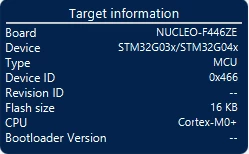
STM32C031G4 recognized as STM32G03x/STM32G04x

  • August 22, 2024
  • 4 replies
  • 1196 views

Hi. I made a custom PCB with an STM32C031 microcontroller. However, I am unable to program it because it is recognized as 0x466. The problem occurs in both STMCubeProgrammer and the IDE. I checked 2 st-links with the latest firmware.

Jin454_0-1724369266054.png


Regards.


Best answer by Jin454

Yes.
STM32CubeProgrammer v2.17.0.
STM32CubeIDE Version: 1.15.1

Tested on Nucleo St-link and St-link v3.
I can see the device memory, but the device type/id is incorrect.


20:07:42 : STM32CubeProgrammer API v2.17.0 | Windows-64Bits
20:07:44 : UR connection mode is defined with the HWrst reset mode
20:07:44 : ST-LINK SN : 066AFF565251887067053241
20:07:44 : ST-LINK FW : V2J45M30
20:07:44 : Board : NUCLEO-F446ZE
20:07:44 : Voltage : 3.27V
20:07:44 : SWD freq : 4000 KHz
20:07:44 : Connect mode: Hot Plug
20:07:44 : Reset mode : Hardware reset
20:07:44 : Device ID : 0x466
20:07:44 : Revision ID : --
20:07:44 : Debug in Low Power mode is not supported for this device.
20:07:44 : UPLOADING OPTION BYTES DATA ...
20:07:44 : Bank : 0x00
20:07:44 : Address : 0x40022020
20:07:44 : Size : 108 Bytes
20:07:44 : Bank : 0x01
20:07:44 : Address : 0x40022080
20:07:44 : Size : 4 Bytes
20:07:44 : UPLOADING ...
20:07:44 : Size : 1024 Bytes
20:07:44 : Address : 0x8000000
20:07:44 : Read progress:
20:07:44 : Data read successfully
20:07:44 : Time elapsed during the read operation is: 00:00:00.012

4 replies

TDK
Super User
August 23, 2024

Are you on STM32CubeProgrammer v2.17.0? What programmer are you using?

"If you feel a post has answered your question, please click ""Accept as Solution""."
Jin454AuthorBest answer
Associate II
August 23, 2024

Yes.
STM32CubeProgrammer v2.17.0.
STM32CubeIDE Version: 1.15.1

Tested on Nucleo St-link and St-link v3.
I can see the device memory, but the device type/id is incorrect.


20:07:42 : STM32CubeProgrammer API v2.17.0 | Windows-64Bits
20:07:44 : UR connection mode is defined with the HWrst reset mode
20:07:44 : ST-LINK SN : 066AFF565251887067053241
20:07:44 : ST-LINK FW : V2J45M30
20:07:44 : Board : NUCLEO-F446ZE
20:07:44 : Voltage : 3.27V
20:07:44 : SWD freq : 4000 KHz
20:07:44 : Connect mode: Hot Plug
20:07:44 : Reset mode : Hardware reset
20:07:44 : Device ID : 0x466
20:07:44 : Revision ID : --
20:07:44 : Debug in Low Power mode is not supported for this device.
20:07:44 : UPLOADING OPTION BYTES DATA ...
20:07:44 : Bank : 0x00
20:07:44 : Address : 0x40022020
20:07:44 : Size : 108 Bytes
20:07:44 : Bank : 0x01
20:07:44 : Address : 0x40022080
20:07:44 : Size : 4 Bytes
20:07:44 : UPLOADING ...
20:07:44 : Size : 1024 Bytes
20:07:44 : Address : 0x8000000
20:07:44 : Read progress:
20:07:44 : Data read successfully
20:07:44 : Time elapsed during the read operation is: 00:00:00.012

Maryem
Technical Moderator
August 27, 2024

Hello @Jin454 ,


I tried connecting an STM32C031 and the device ID is correctly displayed on my end.

Could you please try reading data at @ 0x40015800 as shown below and let me know the value? 

Maryem_1-1724748251624.png

Thank you in advance,


Maryem.

Jin454Author
Associate II
August 30, 2024

I found the cause of the problem.

TDK
Super User
August 30, 2024

What was the cause of the problem? It helps to put it here to close out the thread and make it useful for others.

"If you feel a post has answered your question, please click ""Accept as Solution""."