Explorer
May 11, 2024
Solved

STM32CubeProgrammer cannot connect to MCU using j-link

  • May 11, 2024
  • 9 replies
  • 12525 views

Version: v2.16.0

I`ve downloaded and installed the latest application and was told that the CubeProgrammer could support J-Link now.

the GUI shows that JLink device can be selected:
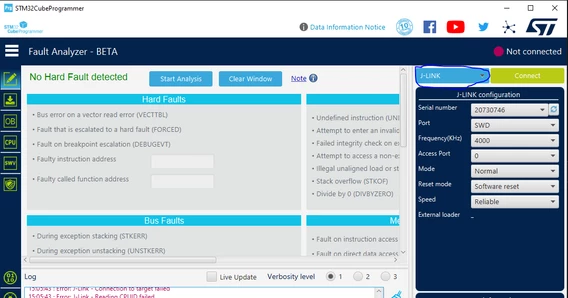
UniverGao_0-1715412382353.png


I clicked the connect bottom, the chip select window of JLink was popped out:
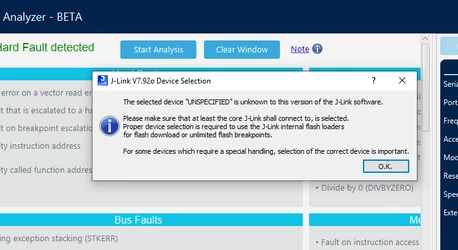
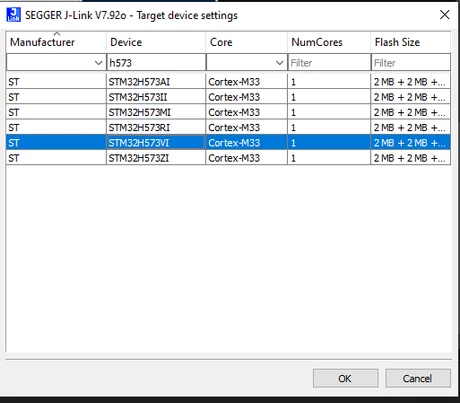
UniverGao_1-1715412644768.png

UniverGao_2-1715412669475.png

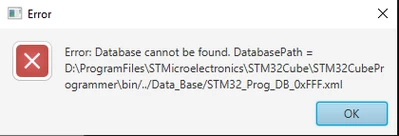
after correct chip was selected, the error window showed below:
UniverGao_3-1715412735928.png

the error logs like this:


 15:30:23 : UR connection mode is defined with the HWrst reset mode
 15:30:23 : 20730746
 15:30:23 : Error: J-Link - Connection to target failed
 15:30:23 : Error: J-Link - Reading CPUID failed
 15:30:23 : Voltage : 3.30V
 15:31:20 : Error: Database cannot be found. DatabasePath = D:\ProgramFiles\STMicroelectronics\STM32Cube\STM32CubeProgrammer\bin/../Data_Base/STM32_Prog_DB_0xFFF.xml
 15:31:20 : Error: flash loader cannot be loaded. FlashLoaderPath = D:\ProgramFiles\STMicroelectronics\STM32Cube\STM32CubeProgrammer\bin/FlashLoader/0xFFF.stldr
 15:31:20 : Error: Database cannot be found. DatabasePath = D:\ProgramFiles\STMicroelectronics\STM32Cube\STM32CubeProgrammer\bin/../Data_Base/STM32_Prog_DB_0xFFF.xml


 I wander if the app support jlink probe, if not, why I can select it?
Best answer by AScha.3

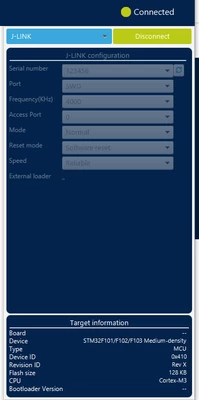
I just tried on my Laptop here, no problem :

AScha3_0-1715417232756.png

AScha3_1-1715417283031.png

Its on Win 10 pro, 22H2 .

ed 

Just i remember : my J-link refused to connect to new H7 series, needs some update to connect to this.

So try connect with an "old" cpu, like the F103 i tested here, to check: problem with J-link version or other.

9 replies

AScha.3
AScha.3Best answer
Super User
May 11, 2024

I just tried on my Laptop here, no problem :

AScha3_0-1715417232756.png

AScha3_1-1715417283031.png

Its on Win 10 pro, 22H2 .

ed 

Just i remember : my J-link refused to connect to new H7 series, needs some update to connect to this.

So try connect with an "old" cpu, like the F103 i tested here, to check: problem with J-link version or other.

"If you feel a post has answered your question, please click ""Accept as Solution""."
Andrew Neil
Super User
May 11, 2024

So can the J-Link connect using Segger's utilities?


A complex system that works is invariably found to have evolved from a simple system that worked.A complex system designed from scratch never works and cannot be patched up to make it work.
Explorer
May 14, 2024

Hello,


I'm having the same problem:

13:24:21 : STM32CubeProgrammer API v2.16.0 | Windows-64Bits
13:26:41 : UR connection mode is defined with the HWrst reset mode
13:26:41 : 52006738
13:26:41 : Error: J-Link - Connection to target failed
13:26:41 : Error: Unable to get Access port number
13:26:41 : Voltage : 3.30V
13:27:04 : Error: Database cannot be found. DatabasePath = C:\Program Files\STMicroelectronics\STM32Cube\STM32CubeProgrammer\bin/../Data_Base/STM32_Prog_DB_0xFFF.xml
13:27:04 : Error: flash loader cannot be loaded. FlashLoaderPath = C:\Program Files\STMicroelectronics\STM32Cube\STM32CubeProgrammer\bin/FlashLoader/0xFFF.stldr
13:27:04 : Error: Database cannot be found. DatabasePath = C:\Program Files\STMicroelectronics\STM32Cube\STM32CubeProgrammer\bin/../Data_Base/STM32_Prog_DB_0xFFF.xml


I found out that the correct database for the STM32 that I'm using (STM32L052K8) should be 0x417, not 0xFFF. Why does it want to choose 0xFFF?


You'll find the configuration I use below:

Meganita_0-1715686849910.png


Andrew Neil
Super User
May 14, 2024

@Meganita wrote:

I'm having the same problem:


So again the same question: 

Can the J-Link connect using Segger's utilities?

If not, Segger have some help on 'Cannot connect to Target' problems:

https://wiki.segger.com/J-Link_cannot_connect_to_the_CPU


See also this ST knowledgebase article on the subject:

https://community.st.com/t5/stm32-mcus/how-to-solve-debugger-connection-issues/ta-p/49693


A complex system that works is invariably found to have evolved from a simple system that worked.A complex system designed from scratch never works and cannot be patched up to make it work.
Explorer
May 14, 2024

As you can see below, the connection between the PC and the J-Link is ok, but not the connection to the target. 

SEGGER J-Link Commander V7.96e (Compiled Apr 17 2024 16:26:32)
DLL version V7.96e, compiled Apr 17 2024 16:25:43

Connecting to J-Link via USB...O.K.
Firmware: J-Link V12 compiled Apr 15 2024 17:37:25
Hardware version: V12.00
J-Link uptime (since boot): 0d 00h 00m 03s
S/N: 52006738
License(s): GDB
USB speed mode: High speed (480 MBit/s)
VTref=3.300V (fixed)


Type "connect" to establish a target connection, '?' for help
J-Link>connect
Please specify device / core. <Default>: STM32L052K8 (ALLOW OPT. BYTES)
Type '?' for selection dialog
Device>
Please specify target interface:
 J) JTAG (Default)
 S) SWD
 T) cJTAG
TIF>S
Specify target interface speed [kHz]. <Default>: 4000 kHz
Speed>
Device "STM32L052K8 (ALLOW OPT. BYTES)" selected.


Connecting to target via SWD
InitTarget() start
SWD selected. Executing JTAG -> SWD switching sequence.
Error: Failed to initialized DAP.
Can not attach to CPU. Trying connect under reset.
SWD selected. Executing JTAG -> SWD switching sequence.
Error: Failed to initialized DAP.
Connecting to CPU via connect under reset failed.
InitTarget() end - Took 308ms
Connect failed. Resetting via Reset pin and trying again.
InitTarget() start
SWD selected. Executing JTAG -> SWD switching sequence.
Error: Failed to initialized DAP.
Can not attach to CPU. Trying connect under reset.
SWD selected. Executing JTAG -> SWD switching sequence.
Error: Failed to initialized DAP.
Connecting to CPU via connect under reset failed.
InitTarget() end - Took 308ms
Error occurred: Could not connect to the target device.
For troubleshooting steps visit: https://wiki.segger.com/J-Link_Troubleshooting
J-Link>

I suppose that "DAP" is "Database Path". 

As per the first link you provided, I have checked VTREF. It is 3.3 V.

I have also reduced the speed down to 100 kHz, but I still have the same error.

As per the second link you provided, SWDIO and SWCLK are "used by the debug".

Andrew Neil
Super User
May 14, 2024

@UniverGao - did you resolve your issue?

A complex system that works is invariably found to have evolved from a simple system that worked.A complex system designed from scratch never works and cannot be patched up to make it work.
Explorer
May 15, 2024

I didn't solve the issue with the J-Link, but I can now program the STM32. I actually found a Nucleo-L433RC and have been able to program the STM32(L052K8) via ST-Link. 

Andrew Neil
Super User
May 15, 2024

So there is something wrong with your J-link and/or its setup and/or connections.

Probably best to take that up with Segger:

https://forum.segger.com/index.php/Board/3-J-Link-Flasher-related/ 

A complex system that works is invariably found to have evolved from a simple system that worked.A complex system designed from scratch never works and cannot be patched up to make it work.
Visitor II
November 4, 2024

This can happen if the board is not being powered. It wont be by the j-link.

Visitor II
November 8, 2024

I have the same problem as the original post, there is definitely a bug with the H7S3/programmer/JLink combination.

Windows 11 23H2
STM32CubeProgrammer v2.17.0
J-Link software V8.10f
J-Link V9.40 firmware 2021 May 7 16:26
Board 1: NUCLEO-H755ZI-Q / chip STM32H755ZIT6
Board 2: NUCLEO-H7S3L8    / chip STM32H7S3L8H6

On the H755 board, my J-Link works great. It recognizes the Device ID 0x450:

lro_0-1731092929109.png

And on the NUCLEO-H7S3L8 (Device ID 0x485) the onboard ST-LINK also connects:

lro_1-1731093176603.png

Then, I can change the power supply to leave the ST-LINK unpowered and power on only the H7S3 and connect the J-Link by cable (I double checked the pinout, it's all correct!). The software shows me the same errors as the original post:

lro_2-1731093592167.pnglro_3-1731093642669.png

Apparently it fails to read the Device ID and looks for Device ID 0xFFF which does not exist. Connecting to Access Port 1 instead returns 0xAAA which also does not exist.
Connecting with J-Link Commander software is fine. Reading DBGMCU_IDCODE (@ 0x5C001000) returns the expected Device ID 0x485.

lro_4-1731096130210.png


Visitor II
March 10, 2025

I'm having a similar issue with one of the chip.  It seems to be working fine with the second chip.

TS5_0-1741649152155.pngTS5_1-1741649196464.png

TS5_2-1741649264926.png


Visitor II
May 25, 2025

jlink.PNG

I just add this tick then it work

FeherAron
Associate II
September 26, 2025

Hello everyone!

I just dropped in, since I had the same problem with J-Link EDU Mini V2.00 and STM32G431 MCU. Updates did not help, and I could connect to the MCU with ST-Link. What solved my connection issue was changing the driver.

For some reason, the J-Link came configured using WinUSB driver. In the J-Link configuration program, I've switched the USB Driver (Windows) to SEGGER, and it instantly worked.