
Solved
STM32CubeProgrammer does not install
Hello, STM32cubeprogrammer fails to install, can you assist?
M1 Macbook Pro (Ventura 13.4.1)
Java Version = 1.8.0_381
STM32CubeProgrammer = 2.14.0
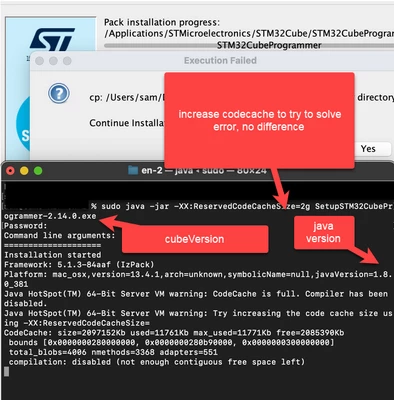

Hello, STM32cubeprogrammer fails to install, can you assist?
M1 Macbook Pro (Ventura 13.4.1)
Java Version = 1.8.0_381
STM32CubeProgrammer = 2.14.0
Hello
Thanks for your feedback,
Please try one of the following solutions:
1- Install CubeProgrammer using the command:
sudo xattr -cr ~/SetupSTM32CubeProgrammer-macos.app2- In case you used the .exe installer (sudo java -jar SetupSTM32CubeProgrammer-2.14.0.exe.) and the popup occurs during the install indicating the following:
""
cp: en.stm32cubeprg-mac_v2-14-0/../../../jre: No such file or directory
Continue Installation?
""
Continue the installation and copy the downloaded jre folder manually into the CubeProg install folder. To do so, please follow the steps below:
- Copy the jre folder from the downloaded en.stm32cubeprg-mac_v2-14-0
- Open CubeProgrammer install folder
- Right click on STM32CubeProgrammer.app and select "Show Package Contents"
- Paste the jre folder
3- After the install, if CubeProgrammer couldn't be launched via GUI, please try to lanch it via CLI as follows,
- Navigate to the /Applications/STMicroelectronics/STM32Cube/STM32CubeProgrammer/STM32CubeProgrammer.app/Contents/MacOs/bin/
- type the command:
java -jar STM32CubeProgrammer- If the jre folder exists in CubeProgrammer install folder, type the following command:
../../../jre/bin/java -jar STM32CubeProgrammerI hope this helps!
Sara.
Enter your E-mail address. We'll send you an e-mail with instructions to reset your password.