

MEige.1
Associate II
December 19, 2023
Solved

STM32CubeProgrammer USB programming failed

  • December 19, 2023
  • 5 replies
  • 5440 views

I'm using a STM32F105 and can program the firmware with an ST-Link to get firmware with USB DFU device driver on the device.

The device gets recognised if I connect it with USB and I can connect and read the memory without issues.

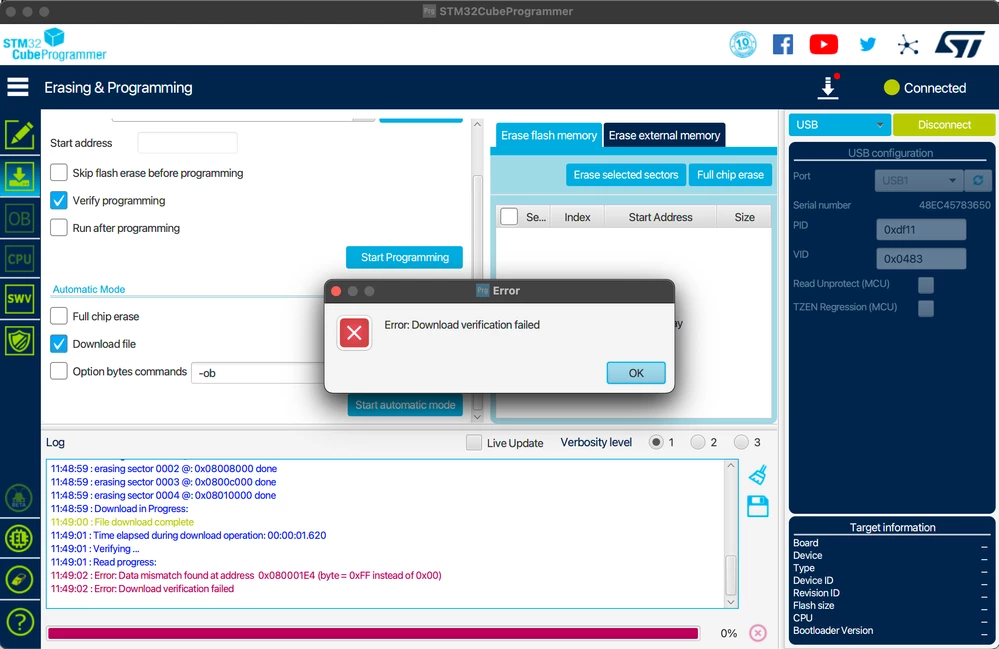
If I try to program a new firmware over USB it all looks good but after the verify step I get an error: Download verification failed.
When I check the firmware is not updated at all. It's weird because in the log I see that the sectors get ereased and download is complete but it seems nothing is written to the flash.

See print screen below.
Scherm­afbeelding 2023-12-19 om 11.49.26.png

This topic has been closed for replies.
Best answer by MEige.1

I removed the software update class and just check VBUS during boot and jump to the device system bootloader if USB power is detected because I only use USB for software updates...

int main(void)
{
 /* USER CODE BEGIN 1 */

 // Check if we can detect VBUS
 // if so we jump to device system bootloader

 // Configure GPIO pin : PA9
 GPIO_InitTypeDef GPIO_InitStruct = {0};
 __HAL_RCC_GPIOA_CLK_ENABLE();
 GPIO_InitStruct.Pin = GPIO_PIN_9;
 GPIO_InitStruct.Mode = GPIO_MODE_INPUT;
 GPIO_InitStruct.Pull = GPIO_NOPULL;
 HAL_GPIO_Init(GPIOA, &GPIO_InitStruct);

 if (HAL_GPIO_ReadPin(GPIOA, GPIO_PIN_9) == GPIO_PIN_SET)
 {
	 // VBUS is present
	 JumpToBootloader();
 }
 else { 
	 // if we do not detect VBUS on PA9 we deinitialize the pin configuration.
	 HAL_GPIO_DeInit(GPIOA, GPIO_PIN_9);
 }
...

void JumpToBootloader(void) {
 void (*SysMemBootJump)(void);

 volatile uint32_t addr = 0x1FFFB000; // System memory bootloader address
 SysMemBootJump = (void (*)(void)) (*((uint32_t *)(addr + 4)));

 // Reset peripherals, disable interrupts
 // we have no peripherals or interrupts started jet!

 // Set main stack pointer
 __set_MSP(*(uint32_t *) addr);

 // Jump to bootloader
 SysMemBootJump();
}


5 replies

TDK
Super User
December 19, 2023

Can you show the contents of flash around 0x08000000?

Can you attach your programming file or show the contents of it around 0x080001E4 if it's a HEX/ELF?

"If you feel a post has answered your question, please click ""Accept as Solution""."
MEige.1
MEige.1Author
Associate II
December 19, 2023

I attached the contents of the flash around 0x08000000 and around 0x080001E4.
I also tried a completely different firmware but nothing get actually written to the flash.

The change around 0x080001E4 is probably only because I hade a minor change in the firmware to be able to detect if programming worked.

Scherm­afbeelding 2023-12-19 om 15.07.49.png

Scherm­afbeelding 2023-12-19 om 15.10.14.png


MM..1
Chief III
December 19, 2023

How value HSE clock used on F105? Too you read chapter 16.3 AN2606

TDK
Super User
December 19, 2023

So the memory starting at 0x08000000 is identical to that starting at 0x080001E4? Seems odd.

Re-reading your first post, it's not clear if you're using the system DFU USB bootloader, or a custom bootloader. If you're using a custom bootloader, which it seems like, then the problem may be in there.

"If you feel a post has answered your question, please click ""Accept as Solution""."
MEige.1
MEige.1Author
Associate II
December 19, 2023

I use the standard USB bootloader.
Device mode and selected Download Firmware Update Class...

Scherm­afbeelding 2023-12-19 om 16.56.16.png


 16:51:25 : STM32CubeProgrammer API v2.15.0 | MacOS-64Bits 
 16:51:30 : UR connection mode is defined with the HWrst reset mode
 16:51:32 : USB speed : Full Speed (12MBit/s)
 16:51:32 : Manuf. ID : STMicroelectronics
 16:51:32 : Product ID : STM32 DownLoad Firmware Update
 16:51:32 : SN : 48EC45783650
 16:51:32 : DFU protocol: 1.1


I might need different USBD_DFU_XFER_SIZE or USBD_DFU_MEDIA interface settings?

MM..1
Chief III
December 19, 2023

You dont reply if used HSE crystal, and if your code and use is as you show then generated code only prepare DFU usb protocol , but no real flash operation. 

1. normal way is use boot into system DFU and this require HSE crystals (clock values in AN2606)

2. if you plan own bootloader then you need write all flash operation in code or use some prepared ...

TDK
Super User
December 19, 2023

I'm not sure STM32CubeProgrammer is going to interact with a custom/user bootloader the way you want. I would suggest using the system bootloader, which can be entered by holding BOOT0 high during reset.

"If you feel a post has answered your question, please click ""Accept as Solution""."
Visitor II
December 20, 2023

Here is a discussion about the error download verification failed: https://community.st.com/t5/stm32cubeprogrammer-mcus/stm32cubeprogrammer-error-download-verification-failed/td-p/256342

You can also check this STMCUBE  IDE tutorial to find out if you're missing something.

https://www.theengineeringprojects.com/2021/10/first-project-using-stm32-in-stm32cubeide.html


MEige.1
MEige.1AuthorBest answer
Associate II
January 18, 2024

I removed the software update class and just check VBUS during boot and jump to the device system bootloader if USB power is detected because I only use USB for software updates...

int main(void)
{
 /* USER CODE BEGIN 1 */

 // Check if we can detect VBUS
 // if so we jump to device system bootloader

 // Configure GPIO pin : PA9
 GPIO_InitTypeDef GPIO_InitStruct = {0};
 __HAL_RCC_GPIOA_CLK_ENABLE();
 GPIO_InitStruct.Pin = GPIO_PIN_9;
 GPIO_InitStruct.Mode = GPIO_MODE_INPUT;
 GPIO_InitStruct.Pull = GPIO_NOPULL;
 HAL_GPIO_Init(GPIOA, &GPIO_InitStruct);

 if (HAL_GPIO_ReadPin(GPIOA, GPIO_PIN_9) == GPIO_PIN_SET)
 {
	 // VBUS is present
	 JumpToBootloader();
 }
 else { 
	 // if we do not detect VBUS on PA9 we deinitialize the pin configuration.
	 HAL_GPIO_DeInit(GPIOA, GPIO_PIN_9);
 }
...

void JumpToBootloader(void) {
 void (*SysMemBootJump)(void);

 volatile uint32_t addr = 0x1FFFB000; // System memory bootloader address
 SysMemBootJump = (void (*)(void)) (*((uint32_t *)(addr + 4)));

 // Reset peripherals, disable interrupts
 // we have no peripherals or interrupts started jet!

 // Set main stack pointer
 __set_MSP(*(uint32_t *) addr);

 // Jump to bootloader
 SysMemBootJump();
}