

STM32L4R9 factory programming
Hello,
I have a custom PCB that uses an STM32L4R9 controller and runs two applications. One is a bootloader and other is the actual app. The files are called boot.hex and app.hex.
The boards are made via a vendor and programmed with these files during ICT. We use ST Link programmer and SWD connection to program the devices.
I use the ST Link V2 Utility CLI to do this.
A batch file is made that runs all the commands that program the option bytes, erase chip, and programs the above files.
The problem I am facing is, the batch file fails to execute the first time. It fails after the option bytes step. The second time however, it always executes and programs the applications successfully.
I did wonder whether this is because the Read Out protection for STM32L4R is set to 1 from the factory? But again, I tried to revert the option bytes to factory after which I cannot read the flash memory again before setting it back to Level 0.
But if I connect a new and unprogrammed board to the ST Link V2 Utility it shows me all the memory content. I also saw that the reset value of the FLASH_OPTR register for the readout protection level is set to 0xAA.
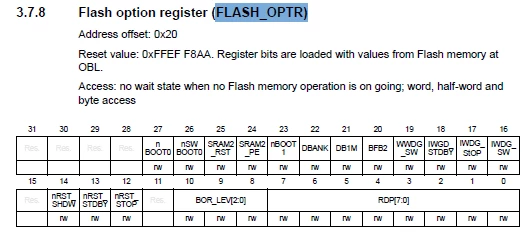
However, datasheet also says that default value, I am assuming factory programmed is Level 1.
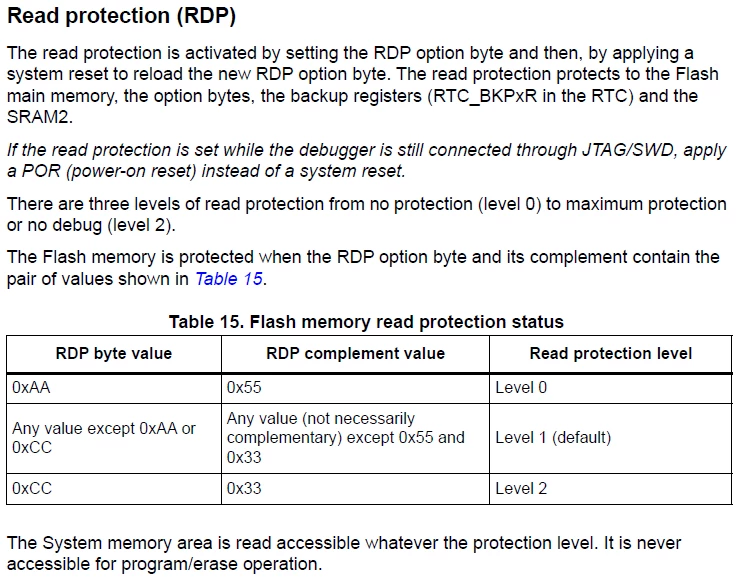
Here is my batch file. Version 1
Could anyone help me with what I am missing in these steps?
setlocal EnableDelayedExpansion
echo This file programs the bootloader and application to blink debug LEDs on PCBA
REM Cater for ST-Link installation on 64 and 32 bit machines
set EXE="%ProgramFiles(x86)%\STMicroelectronics\STM32 ST-LINK Utility\ST-LINK Utility\ST-LINK_CLI.exe"
if not defined ProgramFiles(x86) set EXE="%PROGRAMFILES%\STMicroelectronics\STM32 ST-LINK Utility\ST-LINK Utility\ST-LINK_CLI.exe"
echo Programming micro controller...
echo Erasing flash
%EXE% -c -ME
if %errorlevel% neq 0 goto error
echo Programming Option bytes
%EXE% -c -ob BOR_LEV=3 DBANK=1 -rOB
if %errorlevel% neq 0 goto error
echo Programming application...
%EXE% -c -P "app.hex" -V
if %errorlevel% neq 0 goto error
echo Programming bootloader...
%EXE% -c -P "boot.hex" -V
if %errorlevel% neq 0 goto error
goto ok
:error
echo An error occurred!
goto end
:ok
echo Completed successfully, recommend power cycling the UUT.
:end
REM Show status long enough to be read, then close
timeout /t 10
Another version I had tried was this: VERSION 2
REM Cater for ST-Link installation on 64 and 32 bit machines
set EXE="%ProgramFiles(x86)%\STMicroelectronics\STM32 ST-LINK Utility\ST-LINK Utility\ST-LINK_CLI.exe"
if not defined ProgramFiles(x86) set EXE="%PROGRAMFILES%\STMicroelectronics\STM32 ST-LINK Utility\ST-LINK Utility\ST-LINK_CLI.exe"
echo Erasing flash and setting option bytes...
%EXE% -ME -OB BOR_LEV=3 DBANK=1 -rOB -Q RDP=0xAA
if %errorlevel% neq 0 goto error
echo Programming bootloader application...
%EXE% -P "app.hex" -V -Q RDP=0xAA
if %errorlevel% neq 0 goto error
echo Programming base...
%EXE% -P "boot.hex" -V -Q RDP=0xAA
if %errorlevel% neq 0 goto error
goto ok
:error
echo An error occurred!
goto end
:ok
echo Completed successfully, recommend power cycling the UUT.
:end
REM Show status long enough to be read, then close
timeout /t 10
This also does not seem to work.
A follow up question, after twice running the batch file and programming the boards, no matter what I do on the option bytes, I can always program the boards thereon. Is there a way for me to reset the micro to it's factory state so I can test updated batch files as I am now running about of boards to test.
Thank you in advance for your help.
Makarand