

vbk22398
Senior
January 19, 2025
Question

Unable to detect the chip after programming
  • January 19, 2025
  • 8 replies
  • 4789 views

Screenshot 2025-01-19 170709.png

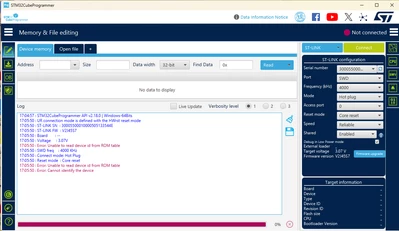
I am programming my STM32F423RHT6. But due to some reason, suddenly I am unable to code the MCU. The connection is getting lost for some reason. I don't know what is the reason for this behavior.  I am attaching my code along with this message. The debugger which I use is an external debugger of stm32. I tried changing TCXO, tried changing the same CHIP. Voltage levels are as per the data sheet. For the 1st few times of programming, am able to flash the code. But after couple of times, facing this issue. 

Note:
I kept programming for peripheral by peripheral and this issue happened suddenly all at once. After finalizing the product and manufacturing parts and soldering, I am facing this issue. Kindly help me out.

Is my chip being dead after few instances of programming?

8 replies

AScha.3
Super User
January 19, 2025

Set CubeProgrammer to mode: normal and reset: software or hardware (try both).

Then show, what it tells.

"If you feel a post has answered your question, please click ""Accept as Solution""."
vbk22398
vbk22398Author
Senior
January 19, 2025

@AScha.3 It is giving ST-LINK Error. (DEV_TARGET_CMD_ERROR)

AScha.3
Super User
January 19, 2025

So no connection to st-link at all ?

Try other usb and other usb-cable...

"If you feel a post has answered your question, please click ""Accept as Solution""."
Technical Moderator
January 20, 2025

Hello @vbk22398 

Is the ST-LINK here fake/clone? or maybe the chip you're trying to connect it?

Please refer to this article to check if you are using a genuine ST-LINK/V2 or a cloned one: How to recognize a genuine ST-LINK/V2 versus a cloned one.

"When your question is answered, please close this topic by clicking ""Accept as Solution"".ThanksImen"
vbk22398
vbk22398Author
Senior
January 21, 2025

@Imen.D It is an original ST-LINK. It is working fine before and after many instances of programming. I don't know if this issue will occur because of the code or not. Kindly check my code further and let me know.

@Ozone @AScha.3 I feel the issue is in the code only. Kindly let me know what I have wronged in my code!

Ozone
Principal
January 21, 2025

First you would need to de-brick your board. I suppose you know how that works, ST has some application notes regarding the ROM bootloader, required applications, and supported interfaces per device.

I cannot provide extensive code reviews for free, but tell you how I would proceed.

I suppose it is not the initial version flashed onto the board, and earlier iterations didn't cause this problem.
In this case, carefully review all changes you made. If necessary, singe-step through the code, starting from the reset vector, not main().
Re-check with the datasheet that you did not reuse the JTAG/SWD interface pins of the MCU. Symptoms would look exactly like that.
Other often-occuring problems are in the startup code, both with memory (RAM) initialisation, external parallel bus interfaces (ext. RAM or Flash), and the clock setup. In combination with faulty/non-existing fault handlers, those can brick the board.

As a side note - from the parts of the schematics provided, it seems to be a custom board, and I can't make out a quartz or another external clock generator for the MCU. If that is true, check your startup code that it does not try to switch to a nonexisting external clock source.

vbk22398
vbk22398Author
Senior
January 21, 2025

@Ozone Thank you for your time and Reply. I will try the same and get back to you.

Ozone
Principal
January 21, 2025

As a side note, I don't know the STM32F423RH specifically.

But if you speak about a custom board, consider design-related hardware problems.
Some might manifest only with higher current consumption and/or clock frequency.

Andrew Neil
Super User
January 21, 2025

@Ozone wrote:

if you speak about a custom board, consider design-related hardware problems.


Indeed.

@vbk22398 Also, if it's the first-produced of a new board, consider manufacturing errors.

A complex system that works is invariably found to have evolved from a simple system that worked.A complex system designed from scratch never works and cannot be patched up to make it work.
Andrew Neil
Super User
January 21, 2025

@vbk22398 wrote:

I kept programming for peripheral by peripheral and this issue happened suddenly all at once. 


So what did you add/change between it last working, and it "suddenly" not working?

eg, did you disable the any/all of the SWD pins ?

A complex system that works is invariably found to have evolved from a simple system that worked.A complex system designed from scratch never works and cannot be patched up to make it work.
vbk22398
vbk22398Author
Senior
January 22, 2025

@Andrew Neil Sir added UART Interrupts for UART4 and UART 5. And added an external GPIO Interrupt. Added few mathematical formulas. The ADC was very random and to reduce the fluctuations, wrote some code using math libraries available by default. I did not enable the floating point in MCU/MPU Settings in STM32 Cube IDE even though I used floating point values. But I did all at once without checking it peripheral by peripheral.

Andrew Neil
Super User
January 22, 2025

@vbk22398 wrote:

added an external GPIO Interrupt. .


You didn't use one of the GPIOs used by the SWD ?

A complex system that works is invariably found to have evolved from a simple system that worked.A complex system designed from scratch never works and cannot be patched up to make it work.
Tesla DeLorean
Guru
January 21, 2025

Can you connect with BOOT0 pin HIGH ?

Do you have some current limitation on the LEDs?

Tips, Buy me a coffee, or three.. PayPal VenmoUp vote any posts that you find helpful, it shows what's working..
vbk22398
vbk22398Author
Senior
January 22, 2025

Sir didn't try that. What should I do sir regarding boot 0 pin. I need de-brick the MCU's.

urbito
Senior II
January 22, 2025

I had once an issue regarding:

urbito_0-1737537323426.png

Which system supply configuration you have on HW? (since for me, your Sch is not very clear)


Then, which one have you put in SW? 


This can let you program your MCU for the first time, but after that first time, it would not boot again until you change it in HW to be as you programmed in SW (in the CubeMX).


Hope this helps.


Greetings


EDIT:


Seems like my guess was wrong, on what to look in, since the capture i posted is for H755 but for F423 there are few similar things that are called: Power Supply Supervisor, that do "the same" as my first guess, and what they do is to check some HW pins and connections with your firmware, as far as i understand at the end the "same thing" is happening, something you have in HW according to the Power Supply Supervisor is in conflict with the SW/FW you have loaded in the MCU, until you make the HW to be the same you have told to the MCU it have when you programmed it, it would not run.


Greetings

vbk22398
vbk22398Author
Senior
January 26, 2025

@urbito Sir, how did you resolve this issue?

urbito
Senior II
February 10, 2025

You have to check the Datasheet for your microcontoller and there is a point regarding the "power supply" or something like that, where there are few examples of circuits needed to provide voltage to your microcontroller, and based on the used circuit, you have to make a configuration in CubeMX.


Hope it helps.

Greetings