
Associate
January 27, 2026
Question

Using STM32CubeProgrammer on Windows Server with USB redirection

  • January 27, 2026
  • 5 replies
  • 359 views

Hello,

I'm trying to use STM32CubeProgrammer with STLink Debug Interface on remote Windows Serveur via RDP.

I installed the driver, the device is detected via USB Redirection
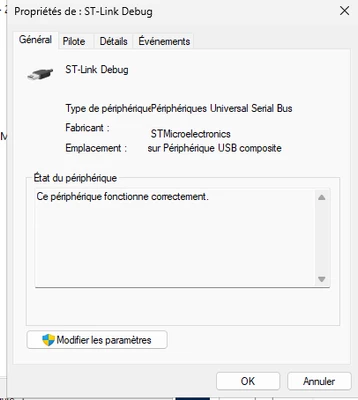
lchan31_0-1769521908271.png

but STM32CubeProgrammer doesnt detect the interface:
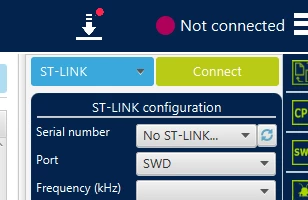
lchan31_1-1769521963386.png

If I directly plug the device on a physical port, it works well.


Do someone successfully set up such a configuration ? Is there any special detection on the app ? It would avoid us to install about 60 windows on our clients!

Thanks :)


5 replies

Pavel A.
Super User
January 27, 2026

Could you share more details on the USB redirection method?

Does the server machine support RemoteFX redirection of  USB devices? (In Group policy: Remote Desktop Session Host → Device and Resource Redirection → Allow RDP redirection of other supported RemoteFX USB devices) ?


lchan31Author
Associate
January 28, 2026

Hello,

Thanks for your reply, here are the infos

Server side: Windows Server 2025 + RDSH role

    Computer Configuration > Policies > Administrative Templates > Windows Components > Remote Desktop Services > Remote Desktop Session Host > Device and Resource Redirection => Do not allow supported Plug and Play device redirection  => Disabled

On the client side:

   - test with Windows 11:

            Computer Configuration > Administrative Templates > Windows Components > Remote Desktop Services >
Remote Desktop Connection Client > RemoteFX USB Device Redirection
"Allow RDP redirection of other supported RemoteFX USB devices from this computer" => Enabled for User and Admins (I think it is a client setting not a server setting)

  - test with freerdp: /usb:auto


With 2 clients St-Link Debug Interface is visible on RDP session


Louis


lchan31Author
Associate
January 28, 2026

lchan31_0-1769602143168.png


Pavel A.
Super User
January 28, 2026

I don't currently have access to a RD server, but the Copilot says what to check on Client and Server sides:

On the client (Windows 11):

  • Use the full Remote Desktop Connection app (mstsc.exe)
  • In Local Resources → More…, check Other supported RemoteFX USB devices
    (or equivalent depending on Windows version)

On the server (Windows Server):

Enable via Group Policy:
Computer Configuration →
    Administrative Templates →
         Windows Components →
              Remote Desktop Services →
                    Remote Desktop Session Host →
                          Device and Resource Redirection →
                               Allow RDP redirection of other supported RemoteFX USB devices


Regarding freerdp:  do you use that instead of the mstsc?

In any case (mstsc or other client) would like to see the Details view of ST-LINK in device manager: Device instance path, Device stack... ?

( Unfortunately there is no quick way to see if the forwarded ST-LINK device has the required device interface property.)


lchan31Author
Associate
January 28, 2026

On the client (Windows 11):

  • Use the full Remote Desktop Connection app (mstsc.exe)
  • In Local Resources → More…, check Other supported RemoteFX USB devices
    (or equivalent depending on Windows version)

=> Yes I activated the device on client that's why it's redirected on the server

lchan31_0-1769610507582.png

Allow RDP redirection of other supported RemoteFX USB devices

=> Yes it's activated too, otherwise the device is not redirected

Regarding freerdp:  do you use that instead of the mstsc?

=> I tried 2 cases:

  - mstsc on Windows 11 client
  - freerdp on Linux + X11


Some details for ST-Link Debug device (sorry it's in french) as seen on the RDSH host

lchan31_6-1769611264104.png


lchan31_7-1769611314738.png


lchan31Author
Associate
January 28, 2026
KeyName Data
------- ----
{3464F7A4-2444-40B1-980A-E0903CB6D912} 10 3
{80497100-8C73-48B9-AAD9-CE387E19C56E} 6 0
{83DA6326-97A6-4088-9453-A1923F573B29} 10 ...2dcee32&0&tsusb-session7-3735928569&1&43b4c4ca-779c-4480-a60c-4c98dc6c1a85
{83DA6326-97A6-4088-9453-A1923F573B29} 15 True
{83DA6326-97A6-4088-9453-A1923F573B29} 3 oem16.inf:c14ce8840c48fa1f:USB_Install:2.2.0.0:USB\VID_0483&PID_374B&MI_00
{A8B865DD-2E3D-4094-AD97-E593A70C75D6} 16 {winusb.inf}
{A8B865DD-2E3D-4094-AD97-E593A70C75D6} 26 False
DEVPKEY_Device_BaseContainerId {BCACF260-E606-5703-AA12-F57AB854E792}
DEVPKEY_Device_BusNumber 0
DEVPKEY_Device_BusReportedDeviceDesc ST-Link Debug
DEVPKEY_Device_BusTypeGuid {9D7DEBBC-C85D-11D1-9EB4-006008C3A19A}
DEVPKEY_Device_Capabilities 130
DEVPKEY_Device_Class USBDevice
DEVPKEY_Device_ClassGuid {88BAE032-5A81-49F0-BC3D-A4FF138216D6}
DEVPKEY_Device_CompatibleIds ...ass_ff, USB\COMPAT_VID_0483&Class_ff, USB\Class_ff&SubClass_ff&Prot_ff...}
DEVPKEY_Device_ConfigFlags 0
DEVPKEY_Device_ConfigurationId oem16.inf:USB\VID_0483&PID_374B&MI_00,USB_Install
DEVPKEY_Device_ContainerId {BCACF260-E606-5703-AA12-F57AB854E792}
DEVPKEY_Device_DeviceDesc STMicroelectronics STLink dongle
DEVPKEY_Device_DevNodeStatus 25174026
DEVPKEY_Device_Driver {88bae032-5a81-49f0-bc3d-a4ff138216d6}\0000
DEVPKEY_Device_DriverDate 01/04/2021 02:00:00
DEVPKEY_Device_DriverDesc STMicroelectronics STLink dongle
DEVPKEY_Device_DriverInfPath oem16.inf
DEVPKEY_Device_DriverInfSection USB_Install
DEVPKEY_Device_DriverProvider STMicroelectronics
DEVPKEY_Device_DriverRank 16711681
DEVPKEY_Device_DriverVersion 2.2.0.0
DEVPKEY_Device_EnumeratorName USB
DEVPKEY_Device_FirstInstallDate 28/01/2026 15:29:44
DEVPKEY_Device_FriendlyName ST-Link Debug
DEVPKEY_Device_HardwareIds {USB\VID_0483&PID_374B&REV_0100&MI_00, USB\VID_0483&PID_374B&MI_00}
DEVPKEY_Device_HasProblem False
DEVPKEY_Device_InLocalMachineContainer False
DEVPKEY_Device_InstallDate 28/01/2026 15:29:44
DEVPKEY_Device_InstallState 0
DEVPKEY_Device_InstanceId USB\VID_0483&PID_374B&REV_0100&MI_00\4&3910C851&0&0000
DEVPKEY_Device_IsPresent True
DEVPKEY_Device_IsRebootRequired False
DEVPKEY_Device_LastArrivalDate 28/01/2026 15:29:44
DEVPKEY_Device_LegacyBusType 15
DEVPKEY_Device_Manufacturer STMicroelectronics
DEVPKEY_Device_MatchingDeviceId USB\VID_0483&PID_374B&MI_00
DEVPKEY_Device_Parent ...2dcee32&0&tsusb-session7-3735928569&1&43b4c4ca-779c-4480-a60c-4c98dc6c1a85
DEVPKEY_Device_PDOName \Device\000000f6
DEVPKEY_Device_PowerData {56, 0, 0, 0...}
DEVPKEY_Device_ProblemCode 0
DEVPKEY_Device_RemovalPolicy 3
DEVPKEY_Device_RemovalPolicyDefault 3
DEVPKEY_Device_ReportedDeviceIdsHash 1655816723
DEVPKEY_Device_SafeRemovalRequired False
DEVPKEY_Device_Service WinUSB
DEVPKEY_Device_SessionId 7
DEVPKEY_Device_Siblings ...4&3910c851&0&0001, USB\VID_0483&PID_374B&REV_0100&MI_02\4&3910c851&0&0002}
DEVPKEY_Device_Stack {\Driver\WINUSB, \Driver\usbccgp}
DEVPKEY_NAME ST-Link Debug