
This topic has been closed for replies.
Best answer by Peter BENSCH

There should be the option J-LINK behind the turquoise drop down button, per default showing ST-LINK:
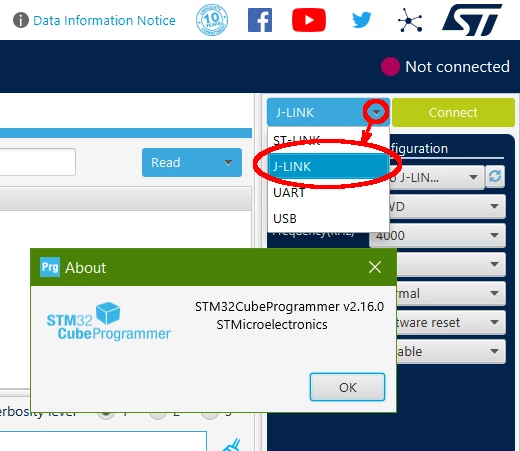
J-LINK.png


3 replies

AScha.3
Super User
April 16, 2024

Hi,

i just downloaded CubeProgrammer , newest version , 2.16.0.

and can select J-Link now :

AScha3_0-1713276085960.png


"If you feel a post has answered your question, please click ""Accept as Solution""."
ASatt
ASattAuthor
Associate II
April 16, 2024

Hi 

Thank you very much for your immediate reply. I have version 2.16.0. But there is no J-link supported in it. Drop down manue does not show  j-link.

ASatt_0-1713291878015.png

regards

A.SATT

Peter BENSCH
Technical Moderator
April 16, 2024

J-LINK is supported since CubeProgrammer 2.16.0 and CubeMonitor 1.8.0.

Does it answer your question?

Regards
/Peter

ASatt
ASattAuthor
Associate II
April 16, 2024

Hi Peter,


I just downloaded the new version. But it did not help as well. There is no option to select J-link. I have windows 11 Home edition installed. Can you please look into this. I had old version installed and i also updated directly from the old version that also did not help. I think something is wrong with installation file.

ASatt_1-1713292305336.png


Peter BENSCH
Peter BENSCHBest answer
Technical Moderator
April 16, 2024

There should be the option J-LINK behind the turquoise drop down button, per default showing ST-LINK:

J-LINK.png


ASatt
ASattAuthor
Associate II
April 16, 2024

Hi Peter,


Thank you very much there it is. I missed that option.
