CWill.3
Associate
December 9, 2020
Question

Error: Code generation could not be done because the necessary firmware package is missing. Not able to complete STM32Cube project creation.

  • December 9, 2020
  • 13 replies
  • 11659 views

I hope this is the right thread for my question. I recently decided to switch to STM32CubeIDE from the online compiler as there is debugging and is offline capable.

I downloaded STM32CubeIDE and went to create a new STM32 Project. I selected my dev board and the firmware files automatically downloaded and unzipped. I then accepted all the default settings, however the error "Code generation could not be done because the necessary firmware package is missing. Not able to complete STM32Cube project creation." was thrown (and is thrown every time I try).

I have tried re-downloading the firmware files (which is painful due to having a very slow and expensive connection because of where I live, hence the desire for offline) and tried suggestions like this: https://community.st.com/s/question/0D53W00000NzOxxSAF/errors-in-stm32cubeide-firmware-update-offline with no success.
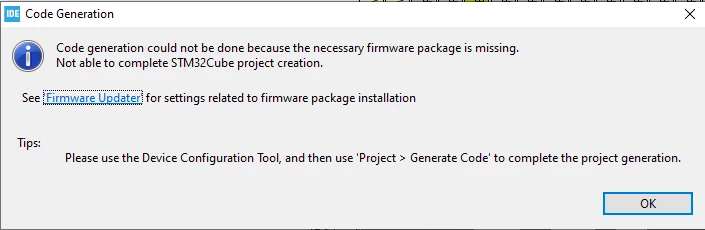
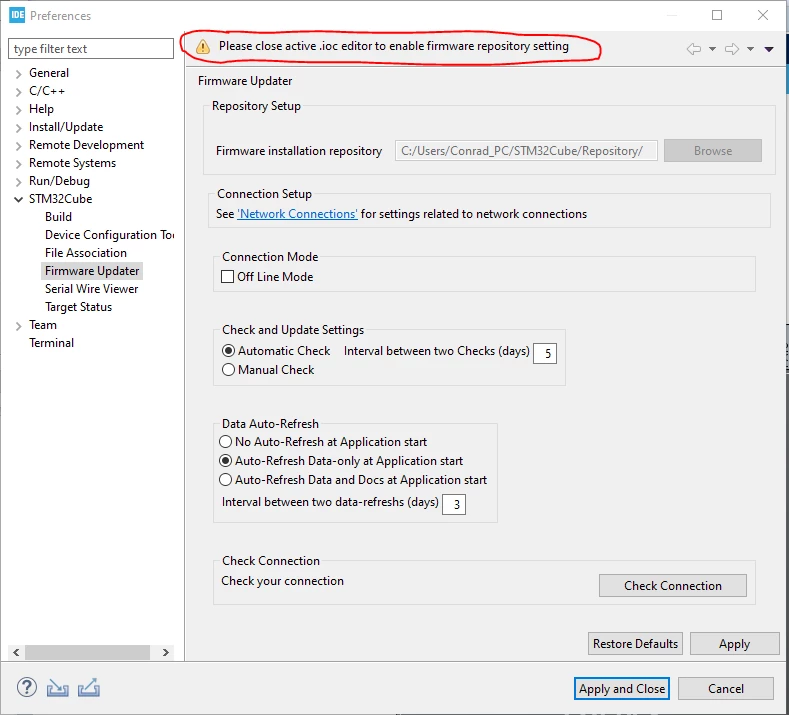
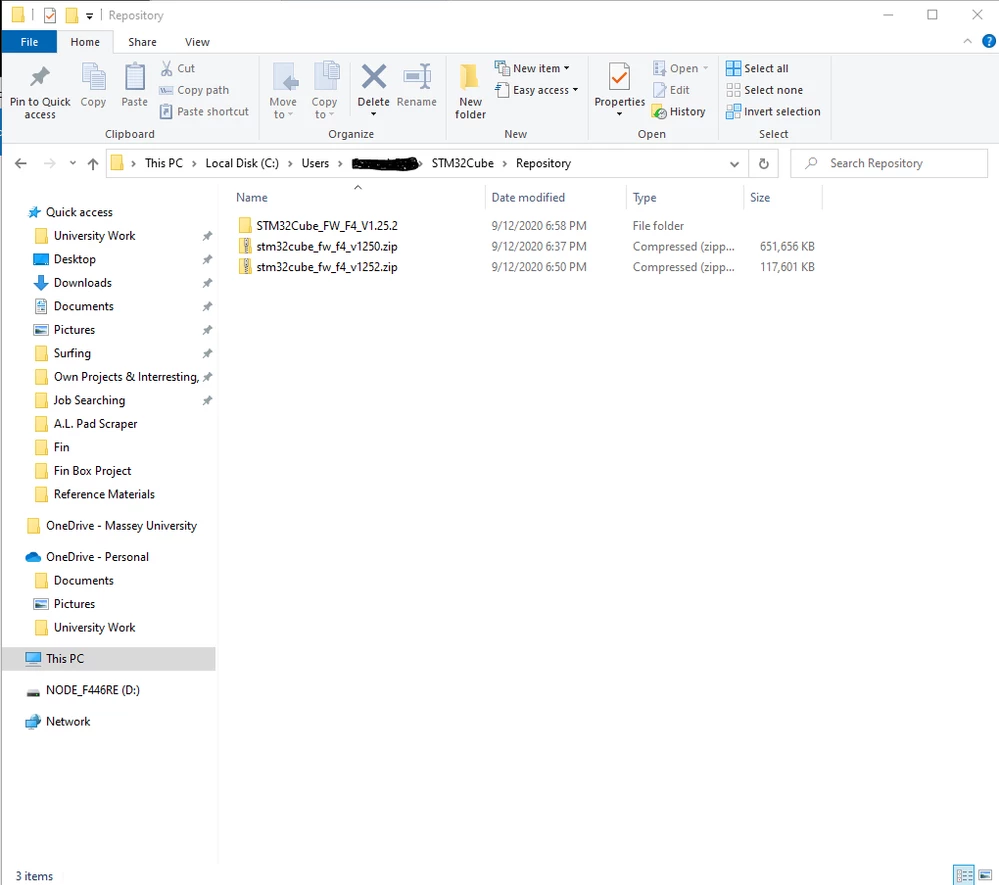
0693W000006F5mEQAS.png0693W000006F5n2QAC.png0693W000006F5nqQAC.pngI also do not know what files I actually need, what the error in the second image means or how to fix it, and what I need to do to fix the firmware repository settings.

  • STM32CubeIDE Version: 1.3.0
  • System: Windows 10
  • Dev Board: NUCLEO-F446RE

Thank you for your help in advance!

13 replies

TDK
Super User
December 9, 2020

To close the IOC file, go to the main window and click the "X" in the tab that shows the IOC file open.

0693W000006F9MUQA0.png 

You can also access the updater in Help -> Check for Updates and Help -> Manage Embedded Software Packages. These updaters work for me.

I also suggest updating to the latest IDE version. There have been worthwhile improvements since 1.3.0.

The process is not very bandwidth friendly, unfortunately.

"If you feel a post has answered your question, please click ""Accept as Solution""."
CWill.3
CWill.3Author
Associate
December 10, 2020

Thanks heaps for your reply!!

I was worried you were going to say ​update haha. But if it needs to be done it needs to be done I suppose! It might have to wait a couple of days before my mobile plan renews though hahaha.

​But I'll ​let you know how it goes! Thanks again!!

Ons KOOLI
Associate
December 10, 2020

Hi CWill.3,

To start working with STM32CubeIDE, you can refer to these links:

  1. How to use STM32CubeIDE
  2. STM32CubeIDE quick start guide
  3. Integrated Development Environment for STM32

Best Regards,

Ons.

CWill.3
CWill.3Author
Associate
February 4, 2021

Hi Ons,

Thank you for your reply!! Sorry I have taken so long to get back to you. I unfortunately had to put this down for a couple of months due to circumstances outside my control.

Yes I have read as much relevant reference material I can find. However, I cannot even start the project as I think cubemx cannot find the files to tell it about how to set up the board I have. At least this is how I understand the issue. I will try and go over those references again with more attention to see if there is anything I have missed!

Thanks again!

Ons KOOLI
Associate
February 26, 2021

Hi CWill.3,

Can you please mark your question as answered in case your issue is solved ?

Best Regards,

Ons.

CWill.3
CWill.3Author
Associate
March 9, 2021

Hi Ons,

Sorry for the late reply. I never did figure out what was going wrong so I ended up switching to a different platform sorry :\

So I'm not sure what to do as the question was never answered but I have moved on now, I don't know what you want to do??

Ons KOOLI
Associate
March 9, 2021

Hi CWill.3,

I hope you come back again and your experience with STM32CubeIDE will be better than previous one as currently several improvements are done with the version 1.6.0

Best Regards,

Ons.

EMcDo.1
Visitor II
December 3, 2021

So I'm having the same issue, both CubeMX and CubeIDE are up to date, yet no luck.

To be clear, I'm able to create/open a workspace, and have an .ioc file. Why the IDE cannot 'create an existing project via .ioc file' is very confusing...

EMcDo.1
Visitor II
December 3, 2021

Just this long 'spinning' and eventually times out with the error above -

0693W00000GZwuuQAD.png

EMcDo.1
Visitor II
December 3, 2021

To be clear, all the code files are present in the directory, why this needs to regenerate anything doesn't makes sense -

0693W00000GZwwHQAT.png

EMcDo.1
Visitor II
December 3, 2021

This is madness... says it wants the given 'firmware package', which appears to be clearly in the default location...

0693W00000GZx9QQAT.png0693W00000GZx9pQAD.png0693W00000GZx8rQAD.png

EMcDo.1
Visitor II
December 7, 2021

Ok learned a lot after tinkering, appears there are a LOT of nuances with the IDE...

At any rate:

  • Ensure you open any 'existing projects' in a fresh directory, NOT in any code dirs or repos you already have
  • You may have to click on .project file and then walk thru the wizard to 'open existing project', following above
  • Seems external drives may crash everything too

Cheers

Explorer
August 26, 2023

I also had the same problem.

Please try uninstalling the CubeIDE software and then reinstalling the CubeIDE with administrator privileges.

I was able to resolve this issue.

Visitor II
April 18, 2024

Problem can be solved simply by login into your ST account from cubeIDE