Associate
May 15, 2024
Solved

Login issue - STM32CubeIDE and STM32MX

  • May 15, 2024
  • 11 replies
  • 8016 views

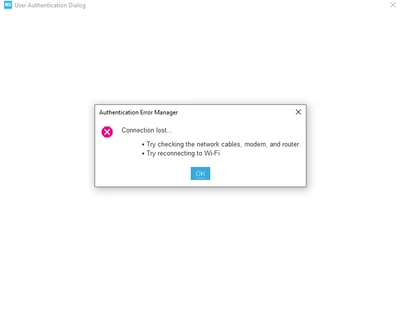
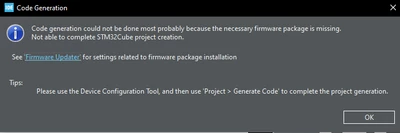
I downloaded version 1.15.1 of the STM32 IDE, but when I start a new project and select the STM32F103C8T6 as the MCU, the first image appears. However, when I try to update the firmware, it asks for a login, and the second image appears. I have searched in several places and realized that this is an error that can occur since versions 1.12/1.13. I have tried changing the network connections to active provider (native, manual, and direct), but it doesn't work. (I'm not sure how the manual one works, but I also saw that it's not good to keep using manual mode). Does anyone have any suggestions? The same problem occurs in STM32MX, and I have also tried changing the internet connection.
inouee_0-1715807624184.png (First image)

inouee_1-1715807726813.png(second image)


    Best answer by mƎALLEm

    Dear all,

    This is an issue some CubeMx/CubeIDE users are facing since yesterday and the issue was escalated internally to be fixed asap. Dedicated teams are working on it.

    11 replies

    norlesh
    Associate III
    May 16, 2024

    HEY ST YOUR WASTING YOUR CLIENTS PATIENCE AND GOOD WILL WITH BULLS@#T LIKE THIS

    This is the second thread I have come across after experiencing the problem myself, meanwhile ST is silent while we waist our time banging our head against a wall trying to fix it, or twiddling our thumbs waiting for the tools to fix there tools - vendor lock in at its finest.

    Senior III
    May 16, 2024

    I too faced this issue yesterday and filed a ticket, they asked me to update or re-install. Not even asked for any additional debug info. Looks very casual and they know there are issues with login....

    Graduate II
    May 16, 2024

    same, same, login fails and MX didn't generate code and don't even show an error !

    Visitor II
    May 16, 2024

    Here also same MyST login issue. Updating and re-install didn't solve the issue.

    rclendan
    Graduate II
    May 16, 2024

    Been down for two days now... I can log in through the web site, but the CubeIDE will not log in. It hangs and says the network is down. I have no proxy, VPN, or firewall blocks. I am working on a new design and can't generate code from the ioc file if not logged in. I would strongly recommend making login optional for critical tasks and just keep retrying in the background.

    NOTE: I had another system that was logging in on its own at startup just fine. I stupily logged out to see if the problem was machine specific and now that system won't log in either.

    Graduate II
    May 16, 2024

    workaround: install CubeIDE 1.12.1

    It has no login functionnality and use latest packages.

    Senior III
    May 16, 2024

    Will it open projets created with newer version? 

    mƎALLEm
    mƎALLEmBest answer
    Technical Moderator
    May 16, 2024

    Dear all,

    This is an issue some CubeMx/CubeIDE users are facing since yesterday and the issue was escalated internally to be fixed asap. Dedicated teams are working on it.

    "To give better visibility on the answered topics, please click on ""Accept as Solution"" on the reply which solved your issue or answered your question."
    Associate
    May 16, 2024

    Here is a video showing the problem 7zipped, I am stuck because of this issue and I will downgrade version to 1.14.1, 1.12.1 or something like this to unblock myself...

    Associate
    May 16, 2024

    Reverting to v1.12.1 and setting MxCube.Version=6.8.1 unblocked the code generation feature.

    This issue needs to be solved before upgrading a newer version. We tried 1.13.2, 1.14.1 and 1.15.1 without being able to do code generation, it seems to be Windows related as a colleague successfully generate code using 1.14.1 under Linux.

    Joe WILLIAMS
    ST Employee
    May 16, 2024

    Hi inouee


    This post has been escalated to the ST Online Support Team for additional assistance."  Add a sentence "Should anyone else have a similar question, please submit your request directly to the ST Online Support Team at https://my.st.com/ols


    Kind Regards

    Joe 

    STMicro Support

    mƎALLEm
    Technical Moderator
    May 17, 2024

    Dear all,

    Seems the issue has been solved please check from your side.

    "To give better visibility on the answered topics, please click on ""Accept as Solution"" on the reply which solved your issue or answered your question."
    Senior III
    May 17, 2024

    I am able to login with version 1.15.1 of IDE. Thanks for your efforts.

    inoueeAuthor
    Associate
    May 17, 2024

    Thank you to everyone who commented and shared the post and to the ST team who solved the problem!