
MFäh.1
Associate III
February 24, 2024
Question

_malloc_r trap

  • February 24, 2024
  • 5 replies
  • 1826 views

Hi

I suddenly have a strange trap, even if i go back to a working version in Git. 
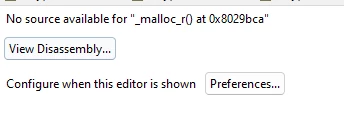
MFh1_0-1708792532241.png

Any Ideas?


Thanks and cheers


    This topic has been closed for replies.

    5 replies

    STTwo-32
    Technical Moderator
    February 24, 2024

    Hello @MFäh.1 

    This error message means that the debugger is trying to access the source code for the _malloc_r() function but cannot find i. I think you should check your debug configuration settings (Optimization Level, and Debug Level). For that, I advise you to check this post (not updated but it Can help) and this video. it may help you. Also, have a look at this article in the debug section: How to make sure the STM32 starts properly in our design?


    Best Regards.


    STTwo-32 

    MFäh.1
    MFäh.1Author
    Associate III
    February 24, 2024

    Thank you very much.

    It helped somewhat: it no longer pops up at this location, but rather later. Is there a way to return to the previous setup (reinstall or something similar)?


    Thanks

    STTwo-32
    Technical Moderator
    February 24, 2024

    Happy to know that work for you. I don't think there is steps to come back to the previous setup. You can ask for any new problem on a new post to give it more visibility so you can get more replies.

    Best Regards.

    STTwo-32 

    MFäh.1
    MFäh.1Author
    Associate III
    February 24, 2024

    It worked partially as the same problem still occurs at another location in the code... so it is not really 'the solution' yet. Any other ideas? What i did was:


    Project => Properties => C/C++ Build (Tree) => Settings => Tool Settings (Tab) => MCU GCC Compiler (Tree) => Optimization

    In the “Optimization Level�? list box field I selected “Optimize for Debug (-Og)"

    Project => Properties => C/C++ Build (Tree) => Settings => Tool Settings (Tab) => MCU GCC Compiler (Tree) => Debugging

    In the “Debug Level�? list box field I selected “Maximum (-g3)�?


    Cheers

    MFäh.1
    MFäh.1Author
    Associate III
    February 24, 2024

    ... and do you have any insight into where this issue might have originated from suddenly?

    TDK
    Super User
    February 24, 2024

    Look in the breakpoints tab for any breakpoint or watchpoint you've forgotten about.

    MFäh.1
    MFäh.1Author
    Associate III
    February 25, 2024

    I reinstalled STMCubeIDE and it is working again. The breakpoints could have been an idea so.


    Thank you all
